mirror of
https://github.com/phil-opp/blog_os.git
synced 2025-12-17 14:57:49 +00:00

638 lines
32 KiB
Markdown
638 lines
32 KiB
Markdown
+++
|
||
title = "VGA字符模式"
|
||
weight = 3
|
||
path = "zh-CN/vga-text-mode"
|
||
date = 2018-02-26
|
||
|
||
+++
|
||
|
||
**VGA字符模式**([VGA text mode])是打印字符到屏幕的一种简单方式。在这篇文章中,为了包装这个模式为一个安全而简单的接口,我们包装unsafe代码到独立的模块。我们还将实现对Rust语言**格式化宏**([formatting macros])的支持。
|
||
|
||
[VGA text mode]: https://en.wikipedia.org/wiki/VGA-compatible_text_mode
|
||
[formatting macros]: https://doc.rust-lang.org/std/fmt/#related-macros
|
||
|
||
<!-- more -->
|
||
|
||
This blog is openly developed on [GitHub]. If you have any problems or questions, please open an issue there. You can also leave comments [at the bottom]. The complete source code for this post can be found in the [`post-03`][post branch] branch.
|
||
|
||
[GitHub]: https://github.com/phil-opp/blog_os
|
||
[at the bottom]: #comments
|
||
[post branch]: https://github.com/phil-opp/blog_os/tree/post-03
|
||
|
||
<!-- toc -->
|
||
|
||
## VGA字符缓冲区
|
||
|
||
为了在VGA字符模式向屏幕打印字符,我们必须将它写入硬件提供的**VGA字符缓冲区**(VGA text buffer)。通常状况下,VGA字符缓冲区是一个25行、80列的二维数组,它的内容将被实时渲染到屏幕。这个数组的元素被称作**字符单元**(character cell),它使用下面的格式描述一个屏幕上的字符:
|
||
|
||
| Bit(s) | Value |
|
||
|-----|----------------|
|
||
| 0-7 | ASCII code point |
|
||
| 8-11 | Foreground color |
|
||
| 12-14 | Background color |
|
||
| 15 | Blink |
|
||
|
||
其中,**前景色**(foreground color)和**背景色**(background color)取值范围如下:
|
||
|
||
| Number | Color | Number + Bright Bit | Bright Color |
|
||
|-----|----------|------|--------|
|
||
| 0x0 | Black | 0x8 | Dark Gray |
|
||
| 0x1 | Blue | 0x9 | Light Blue |
|
||
| 0x2 | Green | 0xa | Light Green |
|
||
| 0x3 | Cyan | 0xb | Light Cyan |
|
||
| 0x4 | Red | 0xc | Light Red |
|
||
| 0x5 | Magenta | 0xd | Pink |
|
||
| 0x6 | Brown | 0xe | Yellow |
|
||
| 0x7 | Light Gray | 0xf | White |
|
||
|
||
每个颜色的第四位称为**加亮位**(bright bit)。
|
||
|
||
要修改VGA字符缓冲区,我们可以通过**存储器映射输入输出**([memory-mapped I/O](https://en.wikipedia.org/wiki/Memory-mapped_I/O))的方式,读取或写入地址`0xb8000`;这意味着,我们可以像操作普通的内存区域一样操作这个地址。
|
||
|
||
需要主页的是,一些硬件虽然映射到存储器,却可能不会完全支持所有的内存操作:可能会有一些设备支持按`u8`字节读取,却在读取`u64`时返回无效的数据。幸运的是,字符缓冲区都[支持标准的读写操作](https://web.stanford.edu/class/cs140/projects/pintos/specs/freevga/vga/vgamem.htm#manip),所以我们不需要用特殊的标准对待它。
|
||
|
||
## 包装到Rust模块
|
||
|
||
既然我们已经知道VGA文字缓冲区如何工作,也是时候创建一个Rust模块来处理文字打印了。我们输入这样的代码:
|
||
|
||
```rust
|
||
// in src/main.rs
|
||
mod vga_buffer;
|
||
```
|
||
|
||
这行代码定义了一个Rust模块,它的内容应当保存在`src/vga_buffer.rs`文件中。使用**2018版次**(2018 edition)的Rust时,我们可以把模块的**子模块**(submodule)文件直接保存到`src/vga_buffer/`文件夹下,与`vga_buffer.rs`文件共存,而无需创建一个`mod.rs`文件。
|
||
|
||
我们的模块暂时不需要添加子模块,所以我们将它创建为`src/vga_buffer.rs`文件。除非另有说明,本文中的代码都保存到这个文件中。
|
||
|
||
### 颜色
|
||
|
||
首先,我们使用Rust的**枚举**(enum)表示一种颜色:
|
||
|
||
```rust
|
||
// in src/vga_buffer.rs
|
||
|
||
#[allow(dead_code)]
|
||
#[derive(Debug, Clone, Copy, PartialEq, Eq)]
|
||
#[repr(u8)]
|
||
pub enum Color {
|
||
Black = 0,
|
||
Blue = 1,
|
||
Green = 2,
|
||
Cyan = 3,
|
||
Red = 4,
|
||
Magenta = 5,
|
||
Brown = 6,
|
||
LightGray = 7,
|
||
DarkGray = 8,
|
||
LightBlue = 9,
|
||
LightGreen = 10,
|
||
LightCyan = 11,
|
||
LightRed = 12,
|
||
Pink = 13,
|
||
Yellow = 14,
|
||
White = 15,
|
||
}
|
||
```
|
||
|
||
我们使用**类似于C语言的枚举**(C-like enum),为每个颜色明确指定一个数字。在这里,每个用`repr(u8)`注记标注的枚举类型,都会以一个`u8`的形式存储——事实上4个二进制位就足够了,但Rust语言并不提供`u4`类型。
|
||
|
||
通常来说,编译器会对每个未使用的变量发出**警告**(warning);使用`#[allow(dead_code)]`,我们可以对`Color`枚举类型禁用这个警告。
|
||
|
||
我们还**生成**([derive](http://rustbyexample.com/trait/derive.html))了 [`Copy`](https://doc.rust-lang.org/nightly/core/marker/trait.Copy.html)、[`Clone`](https://doc.rust-lang.org/nightly/core/clone/trait.Clone.html)、[`Debug`](https://doc.rust-lang.org/nightly/core/fmt/trait.Debug.html)、[`PartialEq`](https://doc.rust-lang.org/nightly/core/cmp/trait.PartialEq.html)和[`Eq`](https://doc.rust-lang.org/nightly/core/cmp/trait.Eq.html) 这几个trait:这让我们的类型遵循**复制语义**([copy semantics](https://doc.rust-lang.org/book/first-edition/ownership.html#copy-types)),也让它可以被比较、被调试打印。
|
||
|
||
为了描述包含前景色和背景色的、完整的**颜色代码**(color code),我们基于`u8`创建一个新类型:
|
||
|
||
```rust
|
||
// in src/vga_buffer.rs
|
||
|
||
#[derive(Debug, Clone, Copy, PartialEq, Eq)]
|
||
#[repr(transparent)]
|
||
struct ColorCode(u8);
|
||
|
||
impl ColorCode {
|
||
fn new(foreground: Color, background: Color) -> ColorCode {
|
||
ColorCode((background as u8) << 4 | (foreground as u8))
|
||
}
|
||
}
|
||
```
|
||
|
||
这里,`ColorCode`类型包装了一个完整的颜色代码字节,它包含前景色和背景色信息。和`Color`类型类似,我们为它生成`Copy`和`Debug`等一系列trait。为了确保`ColorCode`和`u8`有完全相同的内存布局,我们添加[repr(transparent)标记](https://doc.rust-lang.org/nomicon/other-reprs.html#reprtransparent)。
|
||
|
||
### 字符缓冲区
|
||
|
||
现在,我们可以添加更多的结构体,来描述屏幕上的字符和整个字符缓冲区:
|
||
|
||
```rust
|
||
// in src/vga_buffer.rs
|
||
|
||
#[derive(Debug, Clone, Copy, PartialEq, Eq)]
|
||
#[repr(C)]
|
||
struct ScreenChar {
|
||
ascii_character: u8,
|
||
color_code: ColorCode,
|
||
}
|
||
|
||
const BUFFER_HEIGHT: usize = 25;
|
||
const BUFFER_WIDTH: usize = 80;
|
||
|
||
#[repr(transparent)]
|
||
struct Buffer {
|
||
chars: [[ScreenChar; BUFFER_WIDTH]; BUFFER_HEIGHT],
|
||
}
|
||
```
|
||
|
||
在内存布局层面,Rust并不保证按顺序布局成员变量。因此,我们需要使用`#[repr(C)]`标记结构体;这将按C语言约定的顺序布局它的成员变量,让我们能正确地映射内存片段。对`Buffer`类型,我们再次使用`repr(transparent)`,来确保类型和它的单个成员有相同的内存布局。
|
||
|
||
为了输出字符到屏幕,我们来创建一个`Writer`类型:
|
||
|
||
```rust
|
||
// in src/vga_buffer.rs
|
||
|
||
pub struct Writer {
|
||
column_position: usize,
|
||
color_code: ColorCode,
|
||
buffer: &'static mut Buffer,
|
||
}
|
||
```
|
||
|
||
我们将让这个`Writer`类型将字符写入屏幕的最后一行,并在一行写满或收到换行符`\n`的时候,将所有的字符向上位移一行。`column_position`变量将跟踪光标在最后一行的位置。当前字符的前景和背景色将由`color_code`变量指定;另外,我们存入一个VGA字符缓冲区的可变借用到`buffer`变量中。需要注意的是,这里我们对借用使用**显式生命周期**([explicit lifetime](https://doc.rust-lang.org/book/ch10-03-lifetime-syntax.html#lifetime-annotation-syntax)),告诉编译器这个借用在何时有效:我们使用**`'static`生命周期**(['static lifetime](https://doc.rust-lang.org/book/ch10-03-lifetime-syntax.html#the-static-lifetime)),意味着这个借用应该在整个程序的运行期间有效;这对一个全局有效的VGA字符缓冲区来说,是非常合理的。
|
||
|
||
### 打印字符
|
||
|
||
现在我们可以使用`Writer`类型来更改缓冲区内的字符了。首先,为了写入一个ASCII码字节,我们创建这样的函数:
|
||
|
||
```rust
|
||
// in src/vga_buffer.rs
|
||
|
||
impl Writer {
|
||
pub fn write_byte(&mut self, byte: u8) {
|
||
match byte {
|
||
b'\n' => self.new_line(),
|
||
byte => {
|
||
if self.column_position >= BUFFER_WIDTH {
|
||
self.new_line();
|
||
}
|
||
|
||
let row = BUFFER_HEIGHT - 1;
|
||
let col = self.column_position;
|
||
|
||
let color_code = self.color_code;
|
||
self.buffer.chars[row][col] = ScreenChar {
|
||
ascii_character: byte,
|
||
color_code,
|
||
};
|
||
self.column_position += 1;
|
||
}
|
||
}
|
||
}
|
||
|
||
fn new_line(&mut self) {/* TODO */}
|
||
}
|
||
```
|
||
|
||
如果这个字节是一个**换行符**([line feed](https://en.wikipedia.org/wiki/Newline))字节`\n`,我们的`Writer`不应该打印新字符,相反,它将调用我们稍后会实现的`new_line`方法;其它的字节应该将在`match`语句的第二个分支中被打印到屏幕上。
|
||
|
||
当打印字节时,`Writer`将检查当前行是否已满。如果已满,它将首先调用`new_line`方法来将这一行字向上提升,再将一个新的`ScreenChar`写入到缓冲区,最终将当前的光标位置前进一位。
|
||
|
||
要打印整个字符串,我们把它转换为字节并依次输出:
|
||
|
||
```rust
|
||
// in src/vga_buffer.rs
|
||
|
||
impl Writer {
|
||
pub fn write_string(&mut self, s: &str) {
|
||
for byte in s.bytes() {
|
||
match byte {
|
||
// 可以是能打印的ASCII码字节,也可以是换行符
|
||
0x20...0x7e | b'\n' => self.write_byte(byte),
|
||
// 不包含在上述范围之内的字节
|
||
_ => self.write_byte(0xfe),
|
||
}
|
||
|
||
}
|
||
}
|
||
}
|
||
```
|
||
|
||
VGA字符缓冲区只支持ASCII码字节和**代码页437**([Code page 437](https://en.wikipedia.org/wiki/Code_page_437))定义的字节。Rust语言的字符串默认编码为[UTF-8](http://www.fileformat.info/info/unicode/utf8.htm),也因此可能包含一些VGA字符缓冲区不支持的字节:我们使用`match`语句,来区别可打印的ASCII码或换行字节,和其它不可打印的字节。对每个不可打印的字节,我们打印一个`■`符号;这个符号在VGA硬件中被编码为十六进制的`0xfe`。
|
||
|
||
我们可以亲自试一试已经编写的代码。为了这样做,我们可以临时编写一个函数:
|
||
|
||
```rust
|
||
// in src/vga_buffer.rs
|
||
|
||
pub fn print_something() {
|
||
let mut writer = Writer {
|
||
column_position: 0,
|
||
color_code: ColorCode::new(Color::Yellow, Color::Black),
|
||
buffer: unsafe { &mut *(0xb8000 as *mut Buffer) },
|
||
};
|
||
|
||
writer.write_byte(b'H');
|
||
writer.write_string("ello ");
|
||
writer.write_string("Wörld!");
|
||
}
|
||
```
|
||
|
||
这个函数首先创建一个指向`0xb8000`地址VGA缓冲区的`Writer`。实现这一点,我们需要编写的代码可能看起来有点奇怪:首先,我们把整数`0xb8000`强制转换为一个可变的**裸指针**([raw pointer](https://doc.rust-lang.org/book/ch19-01-unsafe-rust.html#dereferencing-a-raw-pointer));之后,通过运算符`*`,我们将这个裸指针解引用;最后,我们再通过`&mut`,再次获得它的可变借用。这些转换需要**`unsafe`语句块**([unsafe block](https://doc.rust-lang.org/book/ch19-01-unsafe-rust.html)),因为编译器并不能保证这个裸指针是有效的。
|
||
|
||
然后它将字节 `b'H'` 写入缓冲区内. 前缀 `b`创建了一个字节常量([byte literal](https://doc.rust-lang.org/reference/tokens.html#byte-literals)),表示单个ASCII码字符;通过尝试写入 `"ello "` 和 `"Wörld!"`,我们可以测试 `write_string` 方法和其后对无法打印字符的处理逻辑。为了观察输出,我们需要在`_start`函数中调用`print_something`方法:
|
||
|
||
```rust
|
||
// in src/main.rs
|
||
#[no_mangle]
|
||
pub extern "C" fn _start() -> ! {
|
||
vga_buffer::print_something();
|
||
loop {}
|
||
}
|
||
```
|
||
|
||
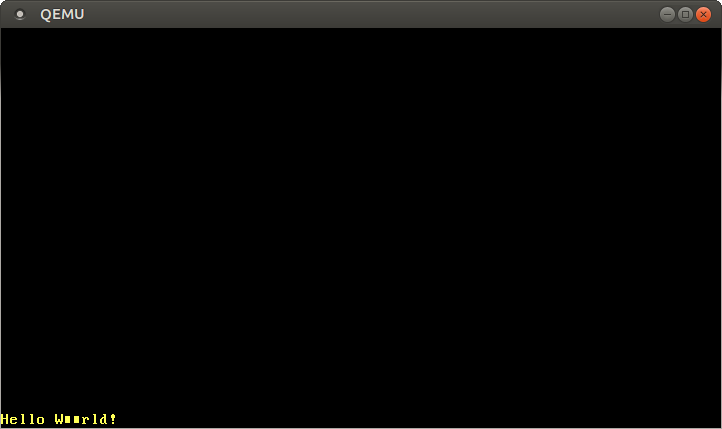
编译运行后,黄色的`Hello W■■rld!`字符串将会被打印在屏幕的左下角:
|
||
|
||
|
||
|
||
需要注意的是,`ö`字符被打印为两个`■`字符。这是因为在[UTF-8](http://www.fileformat.info/info/unicode/utf8.htm)编码下,字符`ö`是由两个字节表述的——而这两个字节并不处在可打印的ASCII码字节范围之内。事实上,这是UTF-8编码的基本特点之一:**如果一个字符占用多个字节,那么每个组成它的独立字节都不是有效的ASCII码字节**(the individual bytes of multi-byte values are never valid ASCII)。
|
||
|
||
### 易失操作
|
||
|
||
我们刚才看到,自己想要输出的信息被正确地打印到屏幕上。然而,未来Rust编译器更暴力的优化可能让这段代码不按预期工作。
|
||
|
||
产生问题的原因在于,我们只向`Buffer`写入,却不再从它读出数据。此时,编译器不知道我们事实上已经在操作VGA缓冲区内存,而不是在操作普通的RAM——因此也不知道产生的**副效应**(side effect),即会有几个字符显示在屏幕上。这时,编译器也许会认为这些写入操作都没有必要,甚至会选择忽略这些操作!所以,为了避免这些并不正确的优化,这些写入操作应当被指定为[易失操作](https://en.wikipedia.org/wiki/Volatile_(computer_programming))。这将告诉编译器,这些写入可能会产生副效应,不应该被优化掉。
|
||
|
||
为了在我们的VGA缓冲区中使用易失的写入操作,我们使用[volatile](https://docs.rs/volatile)库。这个**包**(crate)提供一个名为`Volatile`的**包装类型**(wrapping type)和它的`read`、`write`方法;这些方法包装了`core::ptr`内的[read_volatile](https://doc.rust-lang.org/nightly/core/ptr/fn.read_volatile.html)和[write_volatile](https://doc.rust-lang.org/nightly/core/ptr/fn.write_volatile.html) 函数,从而保证读操作或写操作不会被编译器优化。
|
||
|
||
要添加`volatile`包为项目的**依赖项**(dependency),我们可以在`Cargo.toml`文件的`dependencies`中添加下面的代码:
|
||
|
||
```toml
|
||
# in Cargo.toml
|
||
|
||
[dependencies]
|
||
volatile = "0.2.3"
|
||
```
|
||
|
||
`0.2.3`表示一个**语义版本号**([semantic version number](http://semver.org/)),在cargo文档的[《指定依赖项》章节](https://doc.rust-lang.org/cargo/reference/specifying-dependencies.html)可以找到与它相关的使用指南。
|
||
|
||
现在,我们使用它来完成VGA缓冲区的volatile写入操作。我们将`Buffer`类型的定义修改为下列代码:
|
||
|
||
```rust
|
||
// in src/vga_buffer.rs
|
||
|
||
use volatile::Volatile;
|
||
|
||
struct Buffer {
|
||
chars: [[Volatile<ScreenChar>; BUFFER_WIDTH]; BUFFER_HEIGHT],
|
||
}
|
||
```
|
||
|
||
在这里,我们不使用`ScreenChar`,而选择使用`Volatile<ScreenChar>`——在这里,`Volatile`类型是一个**泛型**([generic](https://doc.rust-lang.org/book/ch10-01-syntax.html)),可以包装几乎所有的类型——这确保了我们不会通过普通的写入操作,意外地向它写入数据;我们转而使用提供的`write`方法。
|
||
|
||
这意味着,我们必须要修改我们的`Writer::write_byte`方法:
|
||
|
||
```rust
|
||
// in src/vga_buffer.rs
|
||
|
||
impl Writer {
|
||
pub fn write_byte(&mut self, byte: u8) {
|
||
match byte {
|
||
b'\n' => self.new_line(),
|
||
byte => {
|
||
...
|
||
|
||
self.buffer.chars[row][col].write(ScreenChar {
|
||
ascii_character: byte,
|
||
color_code: color_code,
|
||
});
|
||
...
|
||
}
|
||
}
|
||
}
|
||
...
|
||
}
|
||
```
|
||
|
||
正如代码所示,我们不再使用普通的`=`赋值,而使用了`write`方法:这能确保编译器不再优化这个写入操作。
|
||
|
||
### 格式化宏
|
||
|
||
支持Rust提供的**格式化宏**(formatting macros)也是一个相当棒的主意。通过这种途径,我们可以轻松地打印不同类型的变量,如整数或浮点数。为了支持它们,我们需要实现[`core::fmt::Write`](https://doc.rust-lang.org/nightly/core/fmt/trait.Write.html) trait;要实现它,唯一需要提供的方法是`write_str`,它和我们先前编写的`write_string`方法差别不大,只是返回值类型变成了`fmt::Result`:
|
||
|
||
```rust
|
||
// in src/vga_buffer.rs
|
||
|
||
use core::fmt::Write;
|
||
|
||
impl fmt::Write for Writer {
|
||
fn write_str(&mut self, s: &str) -> fmt::Result {
|
||
self.write_string(s);
|
||
Ok(())
|
||
}
|
||
}
|
||
```
|
||
|
||
这里,`Ok(())`属于`Result`枚举类型中的`Ok`,包含一个值为`()`的变量。
|
||
|
||
现在我们就可以使用Rust内置的格式化宏`write!`和`writeln!`了:
|
||
|
||
```rust
|
||
// in src/vga_buffer.rs
|
||
|
||
pub fn print_something() {
|
||
use core::fmt::Write;
|
||
let mut writer = Writer {
|
||
column_position: 0,
|
||
color_code: ColorCode::new(Color::Yellow, Color::Black),
|
||
buffer: unsafe { &mut *(0xb8000 as *mut Buffer) },
|
||
};
|
||
|
||
writer.write_byte(b'H');
|
||
writer.write_string("ello! ");
|
||
write!(writer, "The numbers are {} and {}", 42, 1.0/3.0).unwrap();
|
||
}
|
||
```
|
||
|
||
现在,你应该在屏幕下端看到一串`Hello! The numbers are 42 and 0.3333333333333333`。`write!`宏返回的`Result`类型必须被使用,所以我们调用它的[`unwrap`](https://doc.rust-lang.org/core/result/enum.Result.html#method.unwrap)方法,它将在错误发生时panic。这里的情况下应该不会发生这样的问题,因为写入VGA字符缓冲区并没有可能失败。
|
||
|
||
### 换行
|
||
|
||
在之前的代码中,我们忽略了换行符,因此没有处理超出一行字符的情况。当换行时,我们想要把每个字符向上移动一行——此时最顶上的一行将被删除——然后在最后一行的起始位置继续打印。要做到这一点,我们要为`Writer`实现一个新的`new_line`方法:
|
||
|
||
```rust
|
||
// in src/vga_buffer.rs
|
||
|
||
impl Writer {
|
||
fn new_line(&mut self) {
|
||
for row in 1..BUFFER_HEIGHT {
|
||
for col in 0..BUFFER_WIDTH {
|
||
let character = self.buffer.chars[row][col].read();
|
||
self.buffer.chars[row - 1][col].write(character);
|
||
}
|
||
}
|
||
self.clear_row(BUFFER_HEIGHT - 1);
|
||
self.column_position = 0;
|
||
}
|
||
|
||
fn clear_row(&mut self, row: usize) {/* TODO */}
|
||
}
|
||
```
|
||
|
||
我们遍历每个屏幕上的字符,把每个字符移动到它上方一行的相应位置。这里,`..`符号是**区间标号**(range notation)的一种;它表示左闭右开的区间,因此不包含它的上界。在外层的枚举中,我们从第1行开始,省略了对第0行的枚举过程——因为这一行应该被移出屏幕,即它将被下一行的字符覆写。
|
||
|
||
所以我们实现的`clear_row`方法代码如下:
|
||
|
||
```rust
|
||
// in src/vga_buffer.rs
|
||
|
||
impl Writer {
|
||
fn clear_row(&mut self, row: usize) {
|
||
let blank = ScreenChar {
|
||
ascii_character: b' ',
|
||
color_code: self.color_code,
|
||
};
|
||
for col in 0..BUFFER_WIDTH {
|
||
self.buffer.chars[row][col].write(blank);
|
||
}
|
||
}
|
||
}
|
||
```
|
||
|
||
通过向对应的缓冲区写入空格字符,这个方法能清空一整行的字符位置。
|
||
|
||
## 全局接口
|
||
|
||
编写其它模块时,我们希望无需随身携带`Writer`实例,便能使用它的方法。我们尝试创建一个静态的`WRITER`变量:
|
||
|
||
```rust
|
||
// in src/vga_buffer.rs
|
||
|
||
pub static WRITER: Writer = Writer {
|
||
column_position: 0,
|
||
color_code: ColorCode::new(Color::Yellow, Color::Black),
|
||
buffer: unsafe { &mut *(0xb8000 as *mut Buffer) },
|
||
};
|
||
```
|
||
|
||
我们尝试编译这些代码,却发生了下面的编译错误:
|
||
|
||
```
|
||
error[E0015]: calls in statics are limited to constant functions, tuple structs and tuple variants
|
||
--> src/vga_buffer.rs:7:17
|
||
|
|
||
7 | color_code: ColorCode::new(Color::Yellow, Color::Black),
|
||
| ^^^^^^^^^^^^^^^^^^^^^^^^^^^^^^^^^^^^^^^^^^^
|
||
|
||
error[E0396]: raw pointers cannot be dereferenced in statics
|
||
--> src/vga_buffer.rs:8:22
|
||
|
|
||
8 | buffer: unsafe { &mut *(0xb8000 as *mut Buffer) },
|
||
| ^^^^^^^^^^^^^^^^^^^^^^^^^^^^^^ dereference of raw pointer in constant
|
||
|
||
error[E0017]: references in statics may only refer to immutable values
|
||
--> src/vga_buffer.rs:8:22
|
||
|
|
||
8 | buffer: unsafe { &mut *(0xb8000 as *mut Buffer) },
|
||
| ^^^^^^^^^^^^^^^^^^^^^^^^^^^^^^ statics require immutable values
|
||
|
||
error[E0017]: references in statics may only refer to immutable values
|
||
--> src/vga_buffer.rs:8:13
|
||
|
|
||
8 | buffer: unsafe { &mut *(0xb8000 as *mut Buffer) },
|
||
| ^^^^^^^^^^^^^^^^^^^^^^^^^^^^^^^^^^^^^^^^^ statics require immutable values
|
||
```
|
||
|
||
为了明白现在发生了什么,我们需要知道一点:一般的变量在运行时初始化,而静态变量在编译时初始化。Rust编译器规定了一个称为**常量求值器**([const evaluator](https://rust-lang.github.io/rustc-guide/const-eval.html))的组件,它应该在编译时处理这样的初始化工作。虽然它目前的功能较为有限,但对它的扩展工作进展活跃,比如允许在常量中panic的[一篇RFC文档](https://github.com/rust-lang/rfcs/pull/2345)。
|
||
|
||
关于`ColorCode::new`的问题应该能使用**常函数**([`const` functions](https://doc.rust-lang.org/unstable-book/language-features/const-fn.html))解决,但常量求值器还存在不完善之处,它还不能在编译时直接转换裸指针到变量的引用——也许未来这段代码能够工作,但在那之前,我们需要寻找另外的解决方案。
|
||
|
||
### 延迟初始化
|
||
|
||
使用非常函数初始化静态变量是Rust程序员普遍遇到的问题。幸运的是,有一个叫做[lazy_static](https://docs.rs/lazy_static/1.0.1/lazy_static/)的包提供了一个很棒的解决方案:它提供了名为`lazy_static!`的宏,定义了一个**延迟初始化**(lazily initialized)的静态变量;这个变量的值将在第一次使用时计算,而非在编译时计算。这时,变量的初始化过程将在运行时执行,任意的初始化代码——无论简单或复杂——都是能够使用的。
|
||
|
||
现在,我们将`lazy_static`包导入到我们的项目:
|
||
|
||
```toml
|
||
# in Cargo.toml
|
||
|
||
[dependencies.lazy_static]
|
||
version = "1.0"
|
||
features = ["spin_no_std"]
|
||
```
|
||
|
||
在这里,由于程序不连接标准库,我们需要启用`spin_no_std`特性。
|
||
|
||
使用`lazy_static`我们就可以定义一个不出问题的`WRITER`变量:
|
||
|
||
```rust
|
||
// in src/vga_buffer.rs
|
||
|
||
use lazy_static::lazy_static;
|
||
|
||
lazy_static! {
|
||
pub static ref WRITER: Writer = Writer {
|
||
column_position: 0,
|
||
color_code: ColorCode::new(Color::Yellow, Color::Black),
|
||
buffer: unsafe { &mut *(0xb8000 as *mut Buffer) },
|
||
};
|
||
}
|
||
```
|
||
|
||
然而,这个`WRITER`可能没有什么用途,因为它目前还是**不可变变量**(immutable variable):这意味着我们无法向它写入数据,因为所有与写入数据相关的方法都需要实例的可变引用`&mut self`。一种解决方案是使用**可变静态**([mutable static](https://doc.rust-lang.org/book/ch19-01-unsafe-rust.html#accessing-or-modifying-a-mutable-static-variable))的变量,但所有对它的读写操作都被规定为不安全的(unsafe)操作,因为这很容易导致数据竞争或发生其它不好的事情——使用`static mut`极其不被赞成,甚至有一些提案认为[应该将它删除](https://internals.rust-lang.org/t/pre-rfc-remove-static-mut/1437)。也有其它的替代方案,比如可以尝试使用比如[RefCell](https://doc.rust-lang.org/book/ch15-05-interior-mutability.html#keeping-track-of-borrows-at-runtime-with-refcellt)或甚至[UnsafeCell](https://doc.rust-lang.org/nightly/core/cell/struct.UnsafeCell.html)等类型提供的**内部可变性**([interior mutability](https://doc.rust-lang.org/book/ch15-05-interior-mutability.html));但这些类型都被设计为非同步类型,即不满足[Sync](https://doc.rust-lang.org/nightly/core/marker/trait.Sync.html)约束,所以我们不能在静态变量中使用它们。
|
||
|
||
### 自旋锁
|
||
|
||
要定义同步的内部可变性,我们往往使用标准库提供的互斥锁类[Mutex](https://doc.rust-lang.org/nightly/std/sync/struct.Mutex.html),它通过提供当资源被占用时将线程**阻塞**(block)的**互斥条件**(mutual exclusion)实现这一点;但我们初步的内核代码还没有线程和阻塞的概念,我们将不能使用这个类。不过,我们还有一种较为基础的互斥锁实现方式——**自旋锁**([spinlock](https://en.wikipedia.org/wiki/Spinlock))。自旋锁并不会调用阻塞逻辑,而是在一个小的无限循环中反复尝试获得这个锁,也因此会一直占用CPU时间,直到互斥锁被它的占用者释放。
|
||
|
||
为了使用自旋的互斥锁,我们添加[spin包](https://crates.io/crates/spin)到项目的依赖项列表:
|
||
|
||
```toml
|
||
# in Cargo.toml
|
||
[dependencies]
|
||
spin = "0.4.9"
|
||
```
|
||
|
||
现在,我们能够使用自旋的互斥锁,为我们的`WRITER`类实现安全的[内部可变性](https://doc.rust-lang.org/book/ch15-05-interior-mutability.html):
|
||
|
||
```rust
|
||
// in src/vga_buffer.rs
|
||
|
||
use spin::Mutex;
|
||
...
|
||
lazy_static! {
|
||
pub static ref WRITER: Mutex<Writer> = Mutex::new(Writer {
|
||
column_position: 0,
|
||
color_code: ColorCode::new(Color::Yellow, Color::Black),
|
||
buffer: unsafe { &mut *(0xb8000 as *mut Buffer) },
|
||
});
|
||
}
|
||
```
|
||
|
||
现在我们可以删除`print_something`函数,尝试直接在`_start`函数中打印字符:
|
||
|
||
```rust
|
||
// in src/main.rs
|
||
#[no_mangle]
|
||
pub extern "C" fn _start() -> ! {
|
||
use core::fmt::Write;
|
||
vga_buffer::WRITER.lock().write_str("Hello again").unwrap();
|
||
write!(vga_buffer::WRITER.lock(), ", some numbers: {} {}", 42, 1.337).unwrap();
|
||
|
||
loop {}
|
||
}
|
||
```
|
||
|
||
在这里,我们需要导入名为`fmt::Write`的trait,来使用实现它的类的相应方法。
|
||
|
||
### 安全性
|
||
|
||
经过上文的努力后,我们现在的代码只剩一个unsafe语句块,它用于创建一个指向`0xb8000`地址的`Buffer`类型引用;在这步之后,所有的操作都是安全的。Rust将为每个数组访问检查边界,所以我们不会在不经意间越界到缓冲区之外。因此,我们把需要的条件编码到Rust的类型系统,这之后,我们为外界提供的接口就符合内存安全原则了。
|
||
|
||
### `println!`宏
|
||
|
||
现在我们有了一个全局的`Writer`实例,我们就可以基于它实现`println!`宏,这样它就能被任意地方的代码使用了。Rust提供的[宏定义语法](https://doc.rust-lang.org/nightly/book/ch19-06-macros.html#declarative-macros-with-macro_rules-for-general-metaprogramming)需要时间理解,所以我们将不从零开始编写这个宏。我们先看看标准库中[`println!`宏的实现源码](https://doc.rust-lang.org/nightly/std/macro.println!.html):
|
||
|
||
```rust
|
||
#[macro_export]
|
||
macro_rules! println {
|
||
() => (print!("\n"));
|
||
($($arg:tt)*) => (print!("{}\n", format_args!($($arg)*)));
|
||
}
|
||
```
|
||
|
||
宏是通过一个或多个**规则**(rule)定义的,这就像`match`语句的多个分支。`println!`宏有两个规则:第一个规则不要求传入参数——就比如`println!()`——它将被扩展为`print!("\n")`,因此只会打印一个新行;第二个要求传入参数——好比`println!("Rust能够编写操作系统")`或`println!("我学习Rust已经{}年了", 3)`——它将使用`print!`宏扩展,传入它需求的所有参数,并在输出的字符串最后加入一个换行符`\n`。
|
||
|
||
这里,`#[macro_export]`属性让整个包(crate)和基于它的包都能访问这个宏,而不仅限于定义它的模块(module)。它还将把宏置于包的根模块(crate root)下,这意味着比如我们需要通过`use std::println`来导入这个宏,而不是通过`std::macros::println`。
|
||
|
||
[`print!`宏](https://doc.rust-lang.org/nightly/std/macro.print!.html)是这样定义的:
|
||
|
||
```
|
||
#[macro_export]
|
||
macro_rules! print {
|
||
($($arg:tt)*) => ($crate::io::_print(format_args!($($arg)*)));
|
||
}
|
||
```
|
||
|
||
这个宏将扩展为一个对`io`模块中[`_print`函数](https://github.com/rust-lang/rust/blob/29f5c699b11a6a148f097f82eaa05202f8799bbc/src/libstd/io/stdio.rs#L698)的调用。[`$crate`变量](https://doc.rust-lang.org/1.30.0/book/first-edition/macros.html#the-variable-crate)将在`std`包之外被解析为`std`包,保证整个宏在`std`包之外也可以使用。
|
||
|
||
[`format_args!`宏](https://doc.rust-lang.org/nightly/std/macro.format_args.html)将传入的参数搭建为一个[fmt::Arguments](https://doc.rust-lang.org/nightly/core/fmt/struct.Arguments.html)类型,这个类型将被传入`_print`函数。`std`包中的[`_print` 函数](https://github.com/rust-lang/rust/blob/29f5c699b11a6a148f097f82eaa05202f8799bbc/src/libstd/io/stdio.rs#L698)将调用复杂的私有函数`print_to`,来处理对不同`Stdout`设备的支持。我们不需要编写这样的复杂函数,因为我们只需要打印到VGA字符缓冲区。
|
||
|
||
要打印到字符缓冲区,我们把`println!`和`print!`两个宏复制过来,但修改部分代码,让这些宏使用我们定义的`_print`函数:
|
||
|
||
```rust
|
||
// in src/vga_buffer.rs
|
||
|
||
#[macro_export]
|
||
macro_rules! print {
|
||
($($arg:tt)*) => ($crate::vga_buffer::_print(format_args!($($arg)*)));
|
||
}
|
||
|
||
#[macro_export]
|
||
macro_rules! println {
|
||
() => ($crate::print!("\n"));
|
||
($($arg:tt)*) => ($crate::print!("{}\n", format_args!($($arg)*)));
|
||
}
|
||
|
||
#[doc(hidden)]
|
||
pub fn _print(args: fmt::Arguments) {
|
||
use core::fmt::Write;
|
||
WRITER.lock().write_fmt(args).unwrap();
|
||
}
|
||
```
|
||
|
||
我们首先修改了`println!`宏,在每个使用的`print!`宏前面添加了`$crate`变量。这样我们在只需要使用`println!`时,不必也编写代码导入`print!`宏。
|
||
|
||
就像标准库做的那样,我们为两个宏都添加了`#[macro_export]`属性,这样在包的其它地方也可以使用它们。需要注意的是,这将占用包的**根命名空间**(root namespace),所以我们不能通过`use crate::vga_buffer::println`来导入它们;我们应该使用`use crate::println`。
|
||
|
||
另外,`_print`函数将占有静态变量`WRITER`的锁,并调用它的`write_fmt`方法。这个方法是从名为`Write`的trait中获得的,所以我们需要导入这个trait。额外的`unwrap()`函数将在打印不成功的时候panic;但既然我们的`write_str`总是返回`Ok`,这种情况不应该发生。
|
||
|
||
如果这个宏将能在模块外访问,它们也应当能访问`_print`函数,因此这个函数必须是公有的(public)。然而,考虑到这是一个私有的实现细节,我们添加一个[`doc(hidden)`属性](https://doc.rust-lang.org/nightly/rustdoc/the-doc-attribute.html#dochidden),防止它在生成的文档中出现。
|
||
|
||
### 使用`println!`的Hello World
|
||
|
||
现在,我们可以在`_start`里使用`println!`了:
|
||
|
||
```rust
|
||
// in src/main.rs
|
||
|
||
#[no_mangle]
|
||
pub extern "C" fn _start() {
|
||
println!("Hello World{}", "!");
|
||
|
||
loop {}
|
||
}
|
||
```
|
||
|
||
要注意的是,我们在入口函数中不需要导入这个宏——因为它已经被置于包的根命名空间了。
|
||
|
||
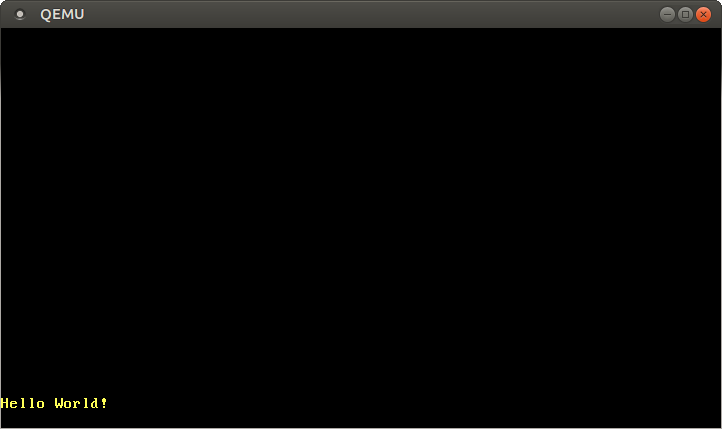
运行这段代码,和我们预料的一样,一个 *“Hello World!”* 字符串被打印到了屏幕上:
|
||
|
||
|
||
|
||
### 打印panic信息
|
||
|
||
既然我们已经有了`println!`宏,我们可以在panic处理函数中,使用它打印panic信息和panic产生的位置:
|
||
|
||
```rust
|
||
// in main.rs
|
||
|
||
/// 这个函数将在panic发生时被调用
|
||
#[panic_handler]
|
||
fn panic(info: &PanicInfo) -> ! {
|
||
println!("{}", info);
|
||
loop {}
|
||
}
|
||
```
|
||
|
||
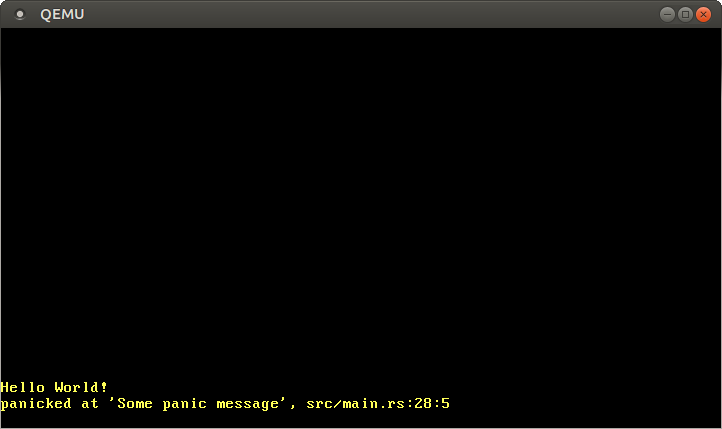
当我们在`_start`函数中插入一行`panic!("Some panic message");`后,我们得到了这样的输出:
|
||
|
||
|
||
|
||
所以,现在我们不仅能知道panic已经发生,还能够知道panic信息和产生panic的代码。
|
||
|
||
## 小结
|
||
|
||
这篇文章中,我们学习了VGA字符缓冲区的结构,以及如何在`0xb8000`的内存映射地址访问它。我们将所有的不安全操作包装为一个Rust模块,以便在外界安全地访问它。
|
||
|
||
我们也发现了——感谢便于使用的cargo——在Rust中使用第三方提供的包是及其容易的。我们添加的两个依赖项,`lazy_static`和`spin`,都在操作系统开发中及其有用;我们将在未来的文章中多次使用它们。
|
||
|
||
## 下篇预告
|
||
|
||
下一篇文章中,我们将会讲述如何配置Rust内置的单元测试框架。我们还将为本文编写的VGA缓冲区模块添加基础的单元测试项目。 |