
40 KiB
+++ title = "A Minimal Rust Kernel" weight = 2 path = "minimal-rust-kernel" date = 2018-02-10
[extra] chapter = "Bare Bones" +++
In this post we create a minimal 64-bit Rust kernel for the x86 architecture. We build upon the freestanding Rust binary from the previous post to create a bootable disk image, that prints something to the screen.
This blog is openly developed on GitHub. If you have any problems or questions, please open an issue there. You can also leave comments at the bottom. The complete source code for this post can be found in the post-02 branch.
The Boot Process
When you turn on a computer, it begins executing firmware code that is stored in motherboard ROM. This code performs a power-on self-test, detects available RAM, and pre-initializes the CPU and hardware. Afterwards it looks for a bootable disk and starts booting the operating system kernel.
On x86, there are two firmware standards: the “Basic Input/Output System“ (BIOS) and the newer “Unified Extensible Firmware Interface” (UEFI). The BIOS standard is old and outdated, but simple and well-supported on any x86 machine since the 1980s. UEFI, in contrast, is more modern and has much more features, but is more complex to set up (at least in my opinion).
Currently, we only provide BIOS support, but support for UEFI is planned, too. If you'd like to help us with this, check out the Github issue.
BIOS
Almost all x86 systems have support for BIOS booting, including newer UEFI-based machines that use an emulated BIOS. This is great, because you can use the same boot logic across all machines from the last centuries. But this wide compatibility is at the same time the biggest disadvantage of BIOS booting, because it means that the CPU is put into a 16-bit compatibility mode called real mode before booting so that archaic bootloaders from the 1980s would still work.
Boot Process
When you turn on a computer, it loads the BIOS from some special flash memory located on the motherboard. The BIOS runs self test and initialization routines of the hardware, then it looks for bootable disks. If it finds one, the control is transferred to its bootloader, which is a 512-byte portion of executable code stored at the disk's beginning. Most bootloaders are larger than 512 bytes, so bootloaders are commonly split into a small first stage, which fits into 512 bytes, and a second stage, which is subsequently loaded by the first stage.
The bootloader has to determine the location of the kernel image on the disk and load it into memory. It also needs to switch the CPU from the 16-bit real mode first to the 32-bit protected mode, and then to the 64-bit long mode, where 64-bit registers and the complete main memory are available. Its third job is to query certain information (such as a memory map) from the BIOS and pass it to the OS kernel.
Writing a BIOS bootloader is a bit cumbersome as it requires assembly language and a lot of non insightful steps like “write this magic value to this processor register”. Therefore we don't cover bootloader creation in this post and instead use the existing bootloader crate to make our kernel bootable. If you are interested in building your own BIOS bootloader: Stay tuned, a set of posts on this topic is already planned!
The Future of BIOS
As noted above, most modern systems still support booting operating systems written for the legacy BIOS firmware for backwards-compatibility. However, there are [plans to remove this support soon][end-bios-support]. Thus, it is strongly recommended to make operating system kernels compatible with the newer UEFI standard too. Fortunately, it is possible to create a kernel that supports booting on both BIOS (for older systems) and UEFI (for modern systems).
UEFI
The Unified Extensible Firmware Interface (UEFI) replaces the classical BIOS firmware on most modern computers. The specification provides lots of useful features that make bootloader implementations much simpler:
- It supports initializing the CPU directly into 64-bit mode, instead of starting in a DOS-compatible 16-bit mode like the BIOS firmware.
- It understands disk partitions and executable files. Thus it is able to fully load the bootloader from disk into memory (no 512-byte large "first stage" is required anymore).
- A standardized specification minimizes the differences between systems. This isn't the case for the legacy BIOS firmware, so that bootloaders often have to try different methods because of hardware differences.
- The specification is independent of the CPU architecture, so that the same interface can be used to boot on
x86_64andARMCPUs. - It natively supports network booting without requiring additional drivers.
The UEFI standard also tries to make the boot process safer through a so-called "secure boot" mechanism. The idea is that the firmware only allows loading bootloaders that are signed by a trusted digital signature. Thus, malware should be prevented from compromising the early boot process.
Issues & Criticism
While most of the UEFI specification sounds like a good idea, there are also many issues with the standard. The main issue for most people is the fear that the secure boot mechanism can be used to lock users into the Windows operating system and thus prevent the installation of alternative operating systems such as Linux.
Another point of criticism is that the large number of features make the UEFI firmware very complex, which increases the chance that there are some bugs in the firmware implementation. This can lead to security problems because the firmware has complete control over the hardware. For example, a vulnerability in the built-in network stack of an UEFI implementation can allow attackers to compromise the system and e.g. silently observe all I/O data. The fact that most UEFI implementations are not open-source makes this issue even more problematic, since there is no way to audit the firmware code for potential bugs.
While there are open firmware projects such as coreboot that try to solve these problems, there is no way around the UEFI standard on most modern consumer computers. So we have to live with these drawbacks for now if we want to build a widely compatible bootloader and operating system kernel.
Boot Process
The UEFI boot process works in the following way:
- After powering on and self-testing all components, the UEFI firmware starts looking for special bootable disk partitions called EFI system partitions. These partitions must be formatted with the FAT file system and assigned a special ID that indicates them as EFI system partition.
- If it finds such a partition, the firmware looks for an executable file named
efi\boot\bootx64.efi(on x86_64 systems). This executable must use the Portable Executable (PE) format, which is common in the Windows world. - It then loads the executable from disk to memory, sets up the execution environment (CPU state, page tables, etc.) in a defined way, and finally jumps to the entry point of the loaded executable.
From this point on, the bootloader executable has control and can proceed to load the operating system kernel. However, it probably needs additional information about the system to do so, for example the amount of available memory in the system. For this reason, the UEFI firmware passes a pointer to a special system table as an argument when invoking the bootloader entry point function. Using this table, the bootloader can query various system information and even invoke special functions provided by the UEFI firmware, for example for accessing the hard disk.
How we will use UEFI
As it is probably clear at this point, the UEFI interface is very powerful and complex. The wide range of functionality makes it even possible to write an operating system directly as an UEFI application, using the UEFI services instead of creating own drivers. In practice, however, most operating systems use UEFI only for the bootloader since own drivers give you more control over the system. We will also follow this path for our OS implementation.
To keep this post focused, we won't cover the creation of an UEFI bootloader in this post. Instead, we will use the already mentioned bootloader crate, which allows loading our kernel on both UEFI and BIOS systems.
If you're interested in how to create an UEFI bootloader: We are planning to cover this in detail in a separate series of posts. If you can't wait, check out our uefi crate and the An EFI App a bit rusty post by Gil Mendes.
The Multiboot Standard
To avoid that every operating system implements its own bootloader, which is only compatible with a single OS, the Free Software Foundation created an open bootloader standard called Multiboot in 1995. The standard defines an interface between the bootloader and operating system, so that any Multiboot compliant bootloader can load any Multiboot compliant operating system on both BIOS and UEFI systems. The reference implementation is GNU GRUB, which is the most popular bootloader for Linux systems.
To make a kernel Multiboot compliant, one just needs to insert a so-called Multiboot header at the beginning of the kernel file. This makes it very easy to boot an OS in GRUB. However, GRUB and the Multiboot standard have some problems too:
- The standard is designed to make the bootloader simple instead of the kernel. For example, the kernel needs to be linked with an adjusted default page size, because GRUB can't find the Multiboot header otherwise. Another example is that the boot information, which is passed to the kernel, contains lots of architecture dependent structures instead of providing clean abstractions.
- The standard supports only the 32-bit protected mode on BIOS systems. This means that you still have to do the CPU configuration to switch to the 64-bit long mode.
- For UEFI systems, the standard provides very little added value as it simply exposes the normal UEFI interface to kernels.
- Both GRUB and the Multiboot standard are only sparsely documented.
- GRUB needs to be installed on the host system to create a bootable disk image from the kernel file. This makes development on Windows or Mac more difficult.
Because of these drawbacks we decided to not use GRUB or the Multiboot standard for this series. However, we plan to add Multiboot support to our bootloader crate, so that it's possible to load your kernel on a GRUB system too. If you're interested in writing a Multiboot compliant kernel, check out the first edition of this blog series.
A Minimal Kernel
Now that we roughly know how a computer boots, it's time to create our own minimal kernel. Our goal is to create a disk image that prints something to the screen when booted. For that we build upon the freestanding Rust binary from the previous post.
As you may remember, we built the freestanding binary through cargo, but depending on the operating system we needed different entry point names and compile flags. That's because cargo builds for the host system by default, i.e. the system you're running on. This isn't something we want for our kernel, because a kernel that runs on top of e.g. Windows does not make much sense. Instead, we want to compile for a clearly defined target system.
Installing Rust Nightly
Rust has three release channels: stable, beta, and nightly. The Rust Book explains the difference between these channels really well, so take a minute and check it out. For building an operating system we will need some experimental features that are only available on the nightly channel, so we need to install a nightly version of Rust.
The recommened tool to manage Rust installations is rustup. It allows you to install nightly, beta, and stable compilers side-by-side and makes it easy to update them. With rustup you can use a nightly compiler for the current directory by running rustup override set nightly. Alternatively, you can add a file called rust-toolchain with the content nightly to the project's root directory. After doing that, you can verify that you have a nightly version installed and active by running rustc --version: The version number should contain -nightly at the end.
The nightly compiler allows us to opt-in to various experimental features by using so-called feature flags at the top of our file. For example, we could enable the experimental asm! macro for inline assembly by adding #![feature(asm)] to the top of our main.rs. Note that such experimental features are completely unstable, which means that future Rust versions might change or remove them without prior warning. For this reason we will only use them if absolutely necessary.
Target Specification
Cargo supports different target systems through the --target parameter. The target is specified as a so-called target triple, which describes the CPU architecture, the vendor, the operating system, and the ABI. For example, the x86_64-unknown-linux-gnu target triple describes a system with a x86_64 CPU, no clear vendor and a Linux operating system with the GNU ABI. Rust supports many different target triples, including arm-linux-androideabi for Android or wasm32-unknown-unknown for WebAssembly.
For our target system, however, we require some special configuration parameters (e.g. no underlying OS), so none of the existing target triples fits. Fortunately, Rust allows us to define our own target through a JSON file. For example, a JSON file that describes the x86_64-unknown-linux-gnu target looks like this:
{
    "llvm-target": "x86_64-unknown-linux-gnu",
    "data-layout": "e-m:e-i64:64-f80:128-n8:16:32:64-S128",
    "arch": "x86_64",
    "target-endian": "little",
    "target-pointer-width": "64",
    "target-c-int-width": "32",
    "os": "linux",
    "executables": true,
    "linker-flavor": "gcc",
    "pre-link-args": ["-m64"],
    "morestack": false
}
Most fields are required by LLVM to generate code for that platform. For example, the data-layout field defines the size of various integer, floating point, and pointer types. Then there are fields that Rust uses for conditional compilation, such as target-pointer-width. The third kind of fields define how the crate should be built. For example, the pre-link-args field specifies arguments passed to the linker.
We also target x86_64 systems with our kernel, so our target specification will look very similar to the one above. Let's start by creating a x86_64-blog_os.json file (choose any name you like) with the common content:
{
    "llvm-target": "x86_64-unknown-none",
    "data-layout": "e-m:e-i64:64-f80:128-n8:16:32:64-S128",
    "arch": "x86_64",
    "target-endian": "little",
    "target-pointer-width": "64",
    "target-c-int-width": "32",
    "os": "none",
    "executables": true
}
Note that we changed the OS in the llvm-target and the os field to none, because our kernel will run on bare metal.
We add the following build-related entries:
-
Override the default linker:
"linker-flavor": "ld.lld",
"linker": "rust-lld",
Instead of using the platform's default linker (which might not support Linux targets), we use the cross platform LLD linker that is shipped with Rust for linking our kernel.
-
Abort on panic:
"panic-strategy": "abort",This setting specifies that the target doesn't support stack unwinding on panic, so instead the program should abort directly. This has the same effect as the
panic = "abort"option in our Cargo.toml, so we can remove it from there. (Note that in contrast to the Cargo.toml option, this target option also applies when we recompile thecorelibrary later in this post. So be sure to add this option, even if you prefer to keep the Cargo.toml option.) -
Disable the red zone:
"disable-redzone": true,We're writing a kernel, so we'll need to handle interrupts at some point. To do that safely, we have to disable a certain stack pointer optimization called the “red zone”, because it would cause stack corruptions otherwise. For more information, see our separate post about disabling the red zone.
-
Disable SIMD:
"features": "-mmx,-sse,+soft-float",The
featuresfield enables/disables target features. We disable themmxandssefeatures by prefixing them with a minus and enable thesoft-floatfeature by prefixing it with a plus. Note that there must be no spaces between different flags, otherwise LLVM fails to interpret the features string.The
mmxandssefeatures determine support for Single Instruction Multiple Data (SIMD) instructions, which can often speed up programs significantly. However, using the large SIMD registers in OS kernels leads to performance problems. The reason is that the kernel needs to restore all registers to their original state before continuing an interrupted program. This means that the kernel has to save the complete SIMD state to main memory on each system call or hardware interrupt. Since the SIMD state is very large (512–1600 bytes) and interrupts can occur very often, these additional save/restore operations considerably harm performance. To avoid this, we disable SIMD for our kernel (not for applications running on top!).A problem with disabling SIMD is that floating point operations on
x86_64require SIMD registers by default. To solve this problem, we add thesoft-floatfeature, which emulates all floating point operations through software functions based on normal integers.
For more information, see our post on disabling SIMD.
After adding all the above entries, our full target specification file looks like this:
{
  "llvm-target": "x86_64-unknown-none",
  "data-layout": "e-m:e-i64:64-f80:128-n8:16:32:64-S128",
  "arch": "x86_64",
  "target-endian": "little",
  "target-pointer-width": "64",
  "target-c-int-width": "32",
  "os": "none",
  "executables": true,
  "linker-flavor": "ld.lld",
  "linker": "rust-lld",
  "panic-strategy": "abort",
  "disable-redzone": true,
  "features": "-mmx,-sse,+soft-float"
}
Building our Kernel
Compiling for our new target will use Linux conventions (I'm not quite sure why, I assume that it's just LLVM's default). This means that we need an entry point named _start as described in the previous post:
// src/main.rs

#![no_std] // don't link the Rust standard library
#![no_main] // disable all Rust-level entry points

use core::panic::PanicInfo;

/// This function is called on panic.
#[panic_handler]
fn panic(_info: &PanicInfo) -> ! {
    loop {}
}

#[no_mangle] // don't mangle the name of this function
pub extern "C" fn _start() -> ! {
    // this function is the entry point, since the linker looks for a function
    // named `_start` by default
    loop {}
}
Note that the entry point needs to be called _start regardless of your host OS.
We can now build the kernel for our new target by passing the name of the JSON file as --target:
> cargo build --target x86_64-blog_os.json

error[E0463]: can't find crate for `core`
It fails! The error tells us that the Rust compiler no longer finds the core library. This library contains basic Rust types such as Result, Option, and iterators, and is implicitly linked to all no_std crates.
The problem is that the core library is distributed together with the Rust compiler as a precompiled library. So it is only valid for supported host triples (e.g., x86_64-unknown-linux-gnu) but not for our custom target. If we want to compile code for a different target, we need to recompile core for this target.
The build-std Option
That's where the build-std feature of cargo comes in. It allows to recompile core and other standard library crates on demand, instead of using the precompiled versions shipped with the Rust installation. This feature is very new and still not finished, so it is marked as "unstable" and only available on nightly Rust compilers.
We can use this feature to recompile the core library by passing -Z build-std=core to the cargo build command:
> cargo build --target x86_64-blog_os.json -Z build-std=core

error: "/…/rustlib/src/rust/Cargo.lock" does not exist,
unable to build with the standard library, try:
    rustup component add rust-src
It still fails. The problem is that cargo needs a copy of the rust source code in order to recompile the core crate. The error message helpfully suggest to provide such a copy by installing the rust-src component.
After running the suggested rustup component add rust-src command, the build should now finally succeed:
> cargo build --target x86_64-blog_os.json -Z build-std=core
   Compiling core v0.0.0 (/…/rust/src/libcore)
   Compiling rustc-std-workspace-core v1.99.0 (/…/rustc-std-workspace-core)
   Compiling compiler_builtins v0.1.32
   Compiling blog_os v0.1.0 (/…/blog_os)
    Finished dev [unoptimized + debuginfo] target(s) in 0.29 secs
We see that cargo build now recompiles the core, compiler_builtins (a dependency of core), and rustc-std-workspace-core (a dependency of compiler_builtins) libraries for our custom target.
Memory-Related Intrinsics
The Rust compiler assumes that a certain set of built-in functions is available for all systems. Most of these functions are provided by the compiler_builtins crate that we just recompiled. However, there are some memory-related functions in that crate that are not enabled by default because they are normally provided by the C library on the system. These functions include memset, which sets all bytes in a memory block to a given value, memcpy, which copies one memory block to another, and memcmp, which compares two memory blocks. While we didn't need any of these functions to compile our kernel right now, they will be required as soon as we add some more code to it (e.g. when copying structs around).
Since we can't link to the C library of the operating system, we need an alternative way to provide these functions to the compiler. One possible approach for this could be to implement our own memset etc. functions and apply the #[no_mangle] attribute to them (to avoid the automatic renaming during compilation). However, this is dangerous since the slightest mistake in the implementation of these functions could lead to bugs and undefined behavior. For example, you might get an endless recursion when implementing memcpy using a for loop because for loops implicitly call the IntoIterator::into_iter trait method, which might call memcpy again. So it's a good idea to reuse existing well-tested implementations instead of creating your own.
Fortunately, the compiler_builtins crate already contains implementations for all the needed functions, they are just disabled by default to not collide with the implementations from the C library. We can enable them by passing an additional -Z build-std-features=compiler-builtins-mem flag to cargo. Like the build-std flag, the build-std-features flag is still unstable, so it might change in the future.
The full build command now looks like this:
cargo build --target x86_64-blog_os.json -Z build-std=core \
    -Z build-std-features=compiler-builtins-mem
(Support for the compiler-builtins-mem feature was only added very recently, so you need at least Rust nightly 2020-09-30 for it.)
Behind the scenes, the new flag enables the mem feature of the compiler_builtins crate. The effect of this is that the #[no_mangle] attribute is applied to the memcpy etc. implementations of the crate, which makes them available to the linker. It's worth noting that these functions are not optimized right now, so their performance might not be the best, but at least they are correct. For x86_64, there is an open pull request to optimize these functions using special assembly instructions.
With this additional flag, our kernel has valid implementations for all compiler-required functions, so it will continue to compile even if our code gets more complex.
Booting our Kernel
As we learned in the section about booting, operating systems are loaded by bootloaders, which are small programs that initialize the hardware to reasonable defaults, load the kernel from disk, and provide it with some fundamental information about the underlying system.
The bootloader Crate
Since bootloaders quite complex on their own, we won't create our own bootloader here (but we are planning a separate series of posts on this). Instead, we will boot our kernel using the bootloader crate. This crate supports both BIOS and UEFI booting, provides all the necessary system information we need, and creates a reasonable default execution environment for our kernel. This way, we can focus on the actual kernel design in the following posts instead of spending a lot of time on system initialization.
To use the bootloader crate, we first need to add a dependency on it:
# in Cargo.toml

[dependencies]
bootloader = "TODO"
For normal Rust crates, this step would be all that need for adding them as a dependency. However, the bootloader crate is a bit special. The problem is that it needs access to our kernel after compilation in order to create a bootable disk image. However, cargo has no support for automatically running code after a successful build, so we need some tricks for this. (There is a proposal for post-build scripts that would solve this issue, but it is not clear yet whether the cargo developers want to add such a feature.)
Creating a Disk Image
The Readme of the bootloader crate describes how to create a bootable disk image for a kernel. The first step is to find the directory where cargo placed the source code of the bootloader dependency. Then, a special build command needs to be executed in that directory, passing the paths to the kernel binary and its Cargo.toml as arguments. This will result in multiple disk image files as output, which can be used to boot the kernel on BIOS and UEFI systems.
A disk_image crate
Since following these steps manually is cumbersome, we create a script to automate it. For that we create a new disk_image crate in a subdirectory:
cargo new --lib disk_image
This command creates a new disk_image subfolder with a /Cargo.toml and a src/lib.rs in it. Since this new cargo project will be tightly coupled with our main project, it makes sense to combine the two crates as a cargo workspace. This way, they will share the same Cargo.lock for their dependencies and place their compilation artifacts in a common target folder. To create such a workpace, we add the following to the Cargo.toml of our main project:
# in Cargo.toml

[workspace]
members = ["disk_image"]
Now the two crates form a workspace. In addition to sharing the Cargo.lock file and target folder, this also means that we can now build the disk_image crate from our root folder by executing cargo build --package disk_image or cargo build -p disk_image for short.
Locating the bootloader Source
Running the Build Command
Adding an Alias
Running it in QEMU
Screen Output
Using cargo run
TODO:
- real machine
Simplify Build Commands
TODO:
- xbuild/xrun aliases
- .cargo/config.toml files -> using not possible because of cargo limitations
OLD
For running bootimage and building the bootloader, you need to have the llvm-tools-preview rustup component installed. You can do so by executing rustup component add llvm-tools-preview.
After executing the command, you should see a bootable disk image named bootimage-blog_os.bin in your target/x86_64-blog_os/debug directory. You can boot it in a virtual machine or copy it to an USB drive to boot it on real hardware. (Note that this is not a CD image, which have a different format, so burning it to a CD doesn't work).
How does it work?
The bootimage tool performs the following steps behind the scenes:
- It compiles our kernel to an ELF file.
- It compiles the bootloader dependency as a standalone executable.
- It links the bytes of the kernel ELF file to the bootloader.
When booted, the bootloader reads and parses the appended ELF file. It then maps the program segments to virtual addresses in the page tables, zeroes the .bss section, and sets up a stack. Finally, it reads the entry point address (our _start function) and jumps to it.
Set a Default Target
To avoid passing the --target parameter on every invocation of cargo build, we can override the default target. To do this, we add the following to our cargo configuration file at .cargo/config.toml:
# in .cargo/config.toml

[build]
target = "x86_64-blog_os.json"
This tells cargo to use our x86_64-blog_os.json target when no explicit --target argument is passed. This means that we can now build our kernel with a simple cargo build. For more information on cargo configuration options, check out the official documentation.
We are now able to build our kernel for a bare metal target with a simple cargo build. However, our _start entry point, which will be called by the boot loader, is still empty. It's time that we output something to screen from it.
Printing to Screen
The easiest way to print text to the screen at this stage is the VGA text buffer. It is a special memory area mapped to the VGA hardware that contains the contents displayed on screen. It normally consists of 25 lines that each contain 80 character cells. Each character cell displays an ASCII character with some foreground and background colors. The screen output looks like this:
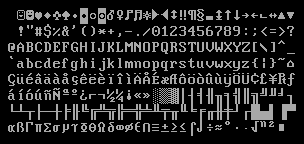
We will discuss the exact layout of the VGA buffer in the next post, where we write a first small driver for it. For printing “Hello World!”, we just need to know that the buffer is located at address 0xb8000 and that each character cell consists of an ASCII byte and a color byte.
The implementation looks like this:
static HELLO: &[u8] = b"Hello World!";

#[no_mangle]
pub extern "C" fn _start() -> ! {
    let vga_buffer = 0xb8000 as *mut u8;

    for (i, &byte) in HELLO.iter().enumerate() {
        unsafe {
            *vga_buffer.offset(i as isize * 2) = byte;
            *vga_buffer.offset(i as isize * 2 + 1) = 0xb;
        }
    }

    loop {}
}
First, we cast the integer 0xb8000 into a raw pointer. Then we iterate over the bytes of the static HELLO byte string. We use the enumerate method to additionally get a running variable i. In the body of the for loop, we use the offset method to write the string byte and the corresponding color byte (0xb is a light cyan).
Note that there's an unsafe block around all memory writes. The reason is that the Rust compiler can't prove that the raw pointers we create are valid. They could point anywhere and lead to data corruption. By putting them into an unsafe block we're basically telling the compiler that we are absolutely sure that the operations are valid. Note that an unsafe block does not turn off Rust's safety checks. It only allows you to do five additional things.
I want to emphasize that this is not the way we want to do things in Rust! It's very easy to mess up when working with raw pointers inside unsafe blocks, for example, we could easily write beyond the buffer's end if we're not careful.
So we want to minimize the use of unsafe as much as possible. Rust gives us the ability to do this by creating safe abstractions. For example, we could create a VGA buffer type that encapsulates all unsafety and ensures that it is impossible to do anything wrong from the outside. This way, we would only need minimal amounts of unsafe and can be sure that we don't violate memory safety. We will create such a safe VGA buffer abstraction in the next post.
Running our Kernel
Now that we have an executable that does something perceptible, it is time to run it. First, we need to turn our compiled kernel into a bootable disk image by linking it with a bootloader. Then we can run the disk image in the QEMU virtual machine or boot it on real hardware using a USB stick.
Booting it in QEMU
We can now boot the disk image in a virtual machine. To boot it in QEMU, execute the following command:
> qemu-system-x86_64 -drive format=raw,file=target/x86_64-blog_os/debug/bootimage-blog_os.bin
warning: TCG doesn't support requested feature: CPUID.01H:ECX.vmx [bit 5]
This opens a separate window with that looks like this:

We see that our "Hello World!" is visible on the screen.
Real Machine
It is also possible to write it to an USB stick and boot it on a real machine:
> dd if=target/x86_64-blog_os/debug/bootimage-blog_os.bin of=/dev/sdX && sync
Where sdX is the device name of your USB stick. Be careful to choose the correct device name, because everything on that device is overwritten.
After writing the image to the USB stick, you can run it on real hardware by booting from it. You probably need to use a special boot menu or change the boot order in your BIOS configuration to boot from the USB stick. Note that it currently doesn't work for UEFI machines, since the bootloader crate has no UEFI support yet.
Using cargo run
To make it easier to run our kernel in QEMU, we can set the runner configuration key for cargo:
# in .cargo/config.toml

[target.'cfg(target_os = "none")']
runner = "bootimage runner"
The target.'cfg(target_os = "none")' table applies to all targets that have set the "os" field of their target configuration file to "none". This includes our x86_64-blog_os.json target. The runner key specifies the command that should be invoked for cargo run. The command is run after a successful build with the executable path passed as first argument. See the cargo documentation for more details.
The bootimage runner command is specifically designed to be usable as a runner executable. It links the given executable with the project's bootloader dependency and then launches QEMU. See the Readme of bootimage for more details and possible configuration options.
Now we can use cargo run to compile our kernel and boot it in QEMU.
What's next?
In the next post, we will explore the VGA text buffer in more detail and write a safe interface for it. We will also add support for the println macro.