+++
title = "UEFI Booting"
path = "booting/uefi"
date = 0000-01-01
template = "edition-3/page.html"
draft = true
[extra]
hide_next_prev = true
icon = '''
'''
+++
This post explains how to create a basic UEFI application from scratch that can be directly booted on modern x86_64 systems.
This includes creating a minimal application suitable for the UEFI environment, turning it into a bootable disk image, and interacting with the hardware through the UEFI system tables and the `uefi` crate.
This blog is openly developed on [GitHub].
If you have any problems or questions, please open an issue there.
You can also leave comments [at the bottom].
[GitHub]: https://github.com/phil-opp/blog_os
[at the bottom]: #comments
## Minimal UEFI App
We start by creating a new `cargo` project with a `Cargo.toml` and a `src/main.rs`.
You can run `cargo new uefi_app` for that or create the files manually:
```toml
# in Cargo.toml
[package]
name = "uefi_app"
version = "0.1.0"
authors = ["Your Name "]
edition = "2018"
[dependencies]
```
In the `src/main.rs`, we create a minimal `no_std` executable as shown in the [_Freestanding Rust Binary_] post:
[_Freestanding Rust Binary_]: @/edition-2/posts/01-freestanding-rust-binary/index.md
```rust
// in src/main.rs
#![no_std]
#![no_main]
use core::panic::PanicInfo;
#[panic_handler]
fn panic(_info: &PanicInfo) -> ! {
loop {}
}
```
The `#![no_std]` attribute disables the linking of the Rust standard library, which is not available on bare metal.
Through the `#![no_main]` attribute, we disable the normal entry point function that based on the C runtime.
The `#[panic_handler]` attribute specifies which function should be called when a panic occurs.
Next, we create an entry point function named `efi_main`:
```rust
// in src/main.rs
#![feature(abi_efiapi)]
use core::ffi::c_void;
#[no_mangle]
pub extern "efiapi" fn efi_main(
image: *mut c_void,
system_table: *const c_void,
) -> usize {
loop {}
}
```
This function signature is standardized by the UEFI specification, which is available [in PDF form][uefi-pdf] on [_uefi.org_].
You can find the signature of the entry point function in section 4.1.
The function name `efi_main` is not required by the standard, but it is the common convention for UEFI applications and the Rust compiler will look for a function with that name by default.
Since UEFI also defines a specific [calling convention] (in section 2.3), we set the [`efiapi` calling convention] for our function.
Support for this calling function is still unstable in Rust, so we need to add `#![feature(abi_efiapi)]` at the very top of our file.
[uefi-pdf]: https://uefi.org/sites/default/files/resources/UEFI%20Spec%202.8B%20May%202020.pdf
[_uefi.org_]: https://uefi.org/specifications
[calling convention]: https://en.wikipedia.org/wiki/Calling_convention
[`efiapi` calling convention]: https://github.com/rust-lang/rust/issues/65815
The function takes two arguments: an _image handle_ and a _system table_.
The image handle is a firmware-allocated handle that identifies the UEFI image.
The system table contains some input and output handles and provides access to various functions provided by the UEFI firmware.
The function returns an `EFI_STATUS` integer to signal whether the function was successful.
It is normally only returned by UEFI apps that are not bootloaders, e.g. UEFI drivers or apps that are launched manually from the UEFI shell.
Bootloaders typically pass control to a OS kernel and never return.
### UEFI Target
Rust has built-in support for UEFI application through its **`x86_64-unknown-uefi`** target, which makes cross-compiling very easy.
If you're curious, you can query the JSON specification of the target with the following command:
```bash
rustc +nightly --print target-spec-json -Z unstable-options --target x86_64-unknown-uefi
```
This outputs looks something like the following:
```json
{
"abi-return-struct-as-int": true,
"allows-weak-linkage": false,
"arch": "x86_64",
"code-model": "large",
"cpu": "x86-64",
"data-layout": "e-m:w-p270:32:32-p271:32:32-p272:64:64-i64:64-f80:128-n8:16:32:64-S128",
"disable-redzone": true,
"emit-debug-gdb-scripts": false,
"exe-suffix": ".efi",
"executables": true,
"features": "-mmx,-sse,+soft-float",
"is-builtin": true,
"is-like-msvc": true,
"is-like-windows": true,
"linker": "rust-lld",
"linker-flavor": "lld-link",
"lld-flavor": "link",
"llvm-target": "x86_64-unknown-windows",
"max-atomic-width": 64,
"os": "uefi",
"panic-strategy": "abort",
"pre-link-args": {
"lld-link": [
"/NOLOGO",
"/NXCOMPAT",
"/entry:efi_main",
"/subsystem:efi_application"
],
"msvc": [
"/NOLOGO",
"/NXCOMPAT",
"/entry:efi_main",
"/subsystem:efi_application"
]
},
"singlethread": true,
"split-debuginfo": "packed",
"stack-probes": {
"kind": "call"
},
"target-pointer-width": "64"
}
```
From the output we can derive multiple properties of the target:
- The `exe-suffix` is `.efi`, which means that all executables compiled for this target have the suffix `.efi`.
- As it's typical for [kernel targets][custom target], both the redzone and SSE are disabled.
- The `is-like-windows` is an indicator that the target uses the conventions of Windows world, e.g. [PE] instead of [ELF] executables.
- The [LLD linker] is used, which ships with Rust.
The linker has native support for cross-linking, which means that we can link Windows executables on non-Windows systems without any problems.
- Like for most bare-metal targets, the `panic-strategy` is set to `abort` to disable unwinding.
- Various linker arguments are specified.
For example, the `/entry` argument sets the name of the entry point function.
This is the reason that we named our entry point function `efi_main` and applied the `#[no_mangle]` attribute above.
[PE]: https://en.wikipedia.org/wiki/Portable_Executable
[ELF]: https://en.wikipedia.org/wiki/Executable_and_Linkable_Format
[LLD linker]: https://lld.llvm.org/
[custom target]: @/edition-2/posts/02-minimal-rust-kernel/index.md#target-specification
If you're interested in understanding all these fields, check out the docs for Rust's internal [`Target`] and [`TargetOptions`] types.
These are the types that the above JSON is converted to.
[`Target`]: https://doc.rust-lang.org/nightly/nightly-rustc/rustc_target/spec/struct.Target.html
[`TargetOptions`]: https://doc.rust-lang.org/nightly/nightly-rustc/rustc_target/spec/struct.TargetOptions.html
### Building
Even though the `x86_64-unknown-uefi` target is a built-in of Rust, there are no precompiled versions of the `core` library available for it.
This means that we need to use cargo's [`build-std` feature] as described in the [_Minimal Kernel_][minimal-kernel-build-std] post.
[`build-std` feature]: https://doc.rust-lang.org/nightly/cargo/reference/unstable.html#build-std
[minimal-kernel-build-std]: @/edition-2/posts/02-minimal-rust-kernel/index.md#the-build-std-option
A nightly Rust compiler is required for building, so we need to set up a [rustup override] for the directory.
We can do this either by running a [`rustup override` command] or by adding a [`rust-toolchain.toml` file].
[rustup override]: https://rust-lang.github.io/rustup/overrides.html
[`rustup override` command]: https://rust-lang.github.io/rustup/overrides.html#directory-overrides
[`rust-toolchain.toml` file]: https://rust-lang.github.io/rustup/overrides.html#the-toolchain-file
After doing that, we can finally build our UEFI app.
The full build command looks like this:
```bash
cargo build --target x86_64-unknown-uefi -Z build-std=core \
-Z build-std-features=compiler-builtins-mem
```
This results in a `uefi_app.efi` file in our `x86_64-unknown-uefi/debug` folder.
Congratulations! We just created our own minimal UEFI app.
## Bootable Disk Image
To make our minimal UEFI app bootable, we need to create a new [GPT] disk image with a [EFI system partition].
On that partition, we need to put our `.efi` file under `efi\boot\bootx64.efi`.
Then the UEFI firmware should automatically detect and load it when we boot from the corresponding disk.
[GPT]: https://en.wikipedia.org/wiki/GUID_Partition_Table
[EFI system partition]: https://en.wikipedia.org/wiki/EFI_system_partition
To create this disk image, we create a new `disk_image` executable:
```bash
> cargo new --bin disk_image
```
This creates a new cargo project in a `disk_image` subdirectory.
To share the `target` folder and `Cargo.lock` file with our `uefi_app` project, we set up a cargo workspace:
```toml
# in Cargo.toml
[workspace]
members = ["disk_image"]
```
### FAT Filesystem
The first step to create an EFI system partition is to create a new partition image formatted with the [FAT] file system.
The reason for using FAT is that this is the only file system that the UEFI standard requires.
In practice, most UEFI firmware implementations also support the [NTFS] filesystem, but we can't rely on that since this is not required by the standard.
[FAT]: https://en.wikipedia.org/wiki/File_Allocation_Table
[NTFS]: https://en.wikipedia.org/wiki/NTFS
To create a new FAT file system, we use the [`fatfs`] crate:
[`fatfs`]: https://docs.rs/fatfs/0.3.5/fatfs/
```toml
# in disk_image/Cargo.toml
[dependencies]
fatfs = "0.3.5"
```
We leave the `main` function unchanged for now and instead create a `create_fat_filesystem` function next to it:
```rust
// in disk_image/src/main.rs
use std::{fs, io, path::Path};
fn create_fat_filesystem(fat_path: &Path, efi_file: &Path) {
// retrieve size of `.efi` file and round it up
let efi_size = fs::metadata(&efi_file).unwrap().len();
// size of a megabyte
let mb = 1024 * 1024;
// round it to next megabyte
let efi_size_rounded = ((efi_size - 1) / mb + 1) * mb;
// create new filesystem image file at the given path and set its length
let fat_file = fs::OpenOptions::new()
.read(true)
.write(true)
.create(true)
.truncate(true)
.open(&fat_path)
.unwrap();
fat_file.set_len(efi_size_rounded).unwrap();
// create new FAT file system and open it
let format_options = fatfs::FormatVolumeOptions::new();
fatfs::format_volume(&fat_file, format_options).unwrap();
let filesystem = fatfs::FileSystem::new(&fat_file, fatfs::FsOptions::new()).unwrap();
// copy EFI file to FAT filesystem
let root_dir = filesystem.root_dir();
root_dir.create_dir("efi").unwrap();
root_dir.create_dir("efi/boot").unwrap();
let mut bootx64 = root_dir.create_file("efi/boot/bootx64.efi").unwrap();
bootx64.truncate().unwrap();
io::copy(&mut fs::File::open(&efi_file).unwrap(), &mut bootx64).unwrap();
}
```
We first use [`fs::metadata`] to query the size of our `.efi` file and then round it up to the next megabyte.
We then use this rounded size to create a new FAT filesystem image file.
(I'm not sure if the rounding is really necessary, but I had some problems with the `fatfs` crate when trying to use the unaligned size.)
[`fs::metadata`]: https://doc.rust-lang.org/std/fs/fn.metadata.html
After creating the file that should hold the FAT filesystem image, we use the [`format_volume`] function of `fatfs` to create the new FAT filesystem.
After creating it, we use the [`FileSystem::new`] function to open it.
The last step is to create the `efi/boot` directory and the `bootx64.efi` file on the filesystem.
To write our `.efi` file to the filesystem image, we use the [`io::copy`] function of the Rust standard library.
[`format_volume`]: https://docs.rs/fatfs/0.3.5/fatfs/fn.format_volume.html
[`FileSystem::new`]: https://docs.rs/fatfs/0.3.5/fatfs/struct.FileSystem.html#method.new
[`io::copy`]: https://doc.rust-lang.org/std/io/fn.copy.html
Note that we're not doing any error handling here to keep the code short.
This is not that problematic because the `disk_image` crate is only part of our build process, but you still might want to use at least [`expect`] instead of `unwrap()` or an error handling crate such as [`anyhow`].
[`expect`]: https://doc.rust-lang.org/std/result/enum.Result.html#method.expect
[`anyhow`]: https://docs.rs/anyhow/1.0.38/anyhow/
### GPT Disk Image
To make the FAT filesystem that we just created bootable, we need to place it as an [EFI system partition] on a [`GPT`]-formatted disk.
To create the GPT disk image, we use the [`gpt`] crate:
[`GPT`]: https://en.wikipedia.org/wiki/GUID_Partition_Table
[`gpt`]: https://docs.rs/gpt/2.0.0/gpt/
```toml
# in disk_image/Cargo.toml
[dependencies]
gpt = "2.0.0"
```
Like for the FAT image, we create a separate function to create the GPT disk image:
```rust
// in disk_image/src/main.rs
use std::{convert::TryFrom, fs::File, io::Seek};
fn create_gpt_disk(disk_path: &Path, fat_image: &Path) {
// create new file
let mut disk = fs::OpenOptions::new()
.create(true)
.truncate(true)
.read(true)
.write(true)
.open(&disk_path)
.unwrap();
// set file size
let partition_size: u64 = fs::metadata(&fat_image).unwrap().len();
let disk_size = partition_size + 1024 * 64; // for GPT headers
disk.set_len(disk_size).unwrap();
// create a protective MBR at LBA0 so that disk is not considered
// unformatted on BIOS systems
let mbr = gpt::mbr::ProtectiveMBR::with_lb_size(
u32::try_from((disk_size / 512) - 1).unwrap_or(0xFF_FF_FF_FF),
);
mbr.overwrite_lba0(&mut disk).unwrap();
// create new GPT structure
let block_size = gpt::disk::LogicalBlockSize::Lb512;
let mut gpt = gpt::GptConfig::new()
.writable(true)
.initialized(false)
.logical_block_size(block_size)
.create_from_device(Box::new(&mut disk), None)
.unwrap();
gpt.update_partitions(Default::default()).unwrap();
// add new EFI system partition and get its byte offset in the file
let partition_id = gpt
.add_partition("boot", partition_size, gpt::partition_types::EFI, 0)
.unwrap();
let partition = gpt.partitions().get(&partition_id).unwrap();
let start_offset = partition.bytes_start(block_size).unwrap();
// close the GPT structure and write out changes
gpt.write().unwrap();
// place the FAT filesystem in the newly created partition
disk.seek(io::SeekFrom::Start(start_offset)).unwrap();
io::copy(&mut File::open(&fat_image).unwrap(), &mut disk).unwrap();
}
```
First, we create a new disk image file at the given `disk_path`.
We set its size to the size of the FAT partition plus some extra amount to account for the GPT structure itself.
To ensure that the disk image is not detected as an unformatted disk on older systems and accidentally overwritten, we create a so-called [_protective MBR_].
The idea is to create a normal [master boot record] structure on the disk that specifies a single partition that spans the whole disk.
This way, older systems that don't know the `GPT` format see a disk formatted with an unknown parititon type instead of an unformatted disk.
[_protective MBR_]: https://en.wikipedia.org/wiki/GUID_Partition_Table#Protective_MBR_(LBA_0)
[master boot record]: https://en.wikipedia.org/wiki/Master_boot_record
Next, we create the actual [`GPT`] structure through the [`GptConfig`] type and its [`create_from_device`] method.
The result is a [`GptDisk`] type that writes to our `disk` file.
Since we want to start with an empty partition table, we use the [`update_partitions`] method to reset the partition table.
This isn't strictly necessary since we create a completely new GPT disk, but it's better to be safe.
[`GptConfig`]: https://docs.rs/gpt/2.0.0/gpt/struct.GptConfig.html
[`create_from_device`]: https://docs.rs/gpt/2.0.0/gpt/struct.GptConfig.html#method.create_from_device
[`GptDisk`]: https://docs.rs/gpt/2.0.0/gpt/struct.GptDisk.html
[`update_partitions`]: https://docs.rs/gpt/2.0.0/gpt/struct.GptDisk.html#method.update_partitions
After resetting the new partition table, we create a new partition named `boot` in the partition table.
This operation only looks for a free region on the disk and stores the offset and size of that region in the table, together with the partition name and type (an [EFI system partition] in this case).
It does not write any bytes to the partition itself.
To do that later, we keep track of the `start_offset` of the partition.
At this point, we are done with the GPT structure.
To write it out to our `disk` file, we use the [`GptDisk::write`] function.
[`GptDisk::write`]: https://docs.rs/gpt/2.0.0/gpt/struct.GptDisk.html#method.write
The final step is to write our `FAT` filesystem image to the newly created partition.
For that we use the [`Seek::seek`] function to move the file cursor to the `start_offset` of the parititon.
We then use the [`io::copy`] function to copy all the bytes from our `FAT` image file to the disk partition.
[`Seek::seek`]: https://doc.rust-lang.org/std/io/trait.Seek.html#tymethod.seek
### Putting it Together
We now have functions to create the FAT filesystem and GPT disk image.
We just need to put them together in our `main` function:
```rust
// in disk_image/src/main.rs
use std::path::PathBuf;
fn main() {
// take efi file path as command line argument
let mut args = std::env::args();
let _exe_name = args.next().unwrap();
let efi_path = PathBuf::from(args.next()
.expect("path to `.efi` files must be given as argument"));
let fat_path = efi_path.with_extension("fat");
let disk_path = fat_path.with_extension("gdt");
create_fat_filesystem(&fat_path, &efi_path);
create_gpt_disk(&disk_path, &fat_path);
}
```
To be flexible, we take the path to the `.efi` file as command line argument.
For retrieving the arguments we use the [`env::args`] function.
The first argument is always set to the path of the `disk_image` executable itself by the operating system, even if the executable is invoked without arguments.
We don't need it, so we prefix the variable name with an underscore to silence the "unused variable" warning.
[`env::args`]: https://doc.rust-lang.org/std/env/fn.args.html
Note that this is a very rudimentary way of doing argument parsing.
There are a lot of crates out there that provide nice abstractions for this, for example [`clap`], [`structopt`], or [`argh`].
It is strongly recommend to use such a crate instead of writing your own argument parsing.
[`clap`]: https://docs.rs/clap/2.33.3/clap/index.html
[`structopt`]: https://docs.rs/structopt/0.3.21/structopt/
[`argh`]: https://docs.rs/argh/0.1.4/argh/
From the `efi_path` given as argument, we construct the `fat_path` and `disk_path`.
By changing only the file extension using [`Path::with_extension`], we place the FAT and GPT image file next to our `.efi` file.
The final step is to invoke our `create_fat_filesystem` and `create_gpt_disk` functions with the corresponding paths as argument.
[`Path::with_extension`]: https://doc.rust-lang.org/std/path/struct.Path.html#method.with_extension
Now we can run our `disk_image` executable to create the bootable disk image from our `uefi_app`:
```
cargo run --package disk_image -- target/x86_64-unknown-uefi/debug/uefi_app.efi
```
Note the additional `--` argument.
The `cargo run` uses this special argument to separate `cargo run` arguments from the arguments that should be passed to the compiled executable.
The path of course depends on your working directory, i.e. whether you run it from the project root or from the `disk_image` subdirectory.
It also depends on whether you compiled the `uefi_app` in debug or `--release` mode.
The result of this command is a `.fat` and a `.gdt` file next to the given `.efi` executable.
These files can be booted on real hardware, but it's easier and safer to start them in a virtual machine first.
In this post, we're using the [**QEMU**](https://www.qemu.org/) emulator.
### Running in QEMU
First, you need to install QEMU on your machine as described on the [QEMU download page].
[QEMU download page]: https://www.qemu.org/download/
After installing QEMU, you can run `qemu-system-x86_64 --version` in a terminal to verify that it is installed.
Since QEMU does not support emulating an UEFI firmware natively, we need to download some additional files to emulate an UEFI firmware.
The files that we need for that are provided by the [Open Virtual Machine Firmware (OVMF)][OVMF] project, which is a sub-project of [TianoCore] and implements UEFI support for virtual machines.
Unfortunately, the project is only [sparsely documented][ovmf-whitepaper] and does not even have a clear homepage.
[OVMF]: https://github.com/tianocore/tianocore.github.io/wiki/OVMF
[TianoCore]: https://www.tianocore.org/
[ovmf-whitepaper]: https://www.linux-kvm.org/downloads/lersek/ovmf-whitepaper-c770f8c.txt
The easiest way to work with OVMF is to download pre-built images of the code.
We provide such images in the [`rust-osdev/ovmf-prebuilt`] repository, which is updated daily from [Gerd Hoffman's RPM builds](https://www.kraxel.org/repos/).
The compiled OVMF are provided as [GitHub releases][ovmf-prebuilt-releases].
[`rust-osdev/ovmf-prebuilt`]: https://github.com/rust-osdev/ovmf-prebuilt/
[ovmf-prebuilt-releases]: https://github.com/rust-osdev/ovmf-prebuilt/releases/latest
To run our UEFI disk image in QEMU, we need the **`OVMF_pure-efi.fd`** file (other files might work as well).
After downloading it, we can then run our UEFI disk image using the following command:
```
qemu-system-x86_64 -drive \
format=raw,file=target/x86_64-unknown-uefi/debug/uefi_app.gdt \
-bios /path/to/OVMF_pure-efi.fd
```
The result should look something like this:

We don't see any output from our `uefi_app` on the screen yet since we only `loop {}` in our `efi_main`.
Instead, we see some output from the UEFI firmware itself that was created before our application was started.
[`uefi`]: https://docs.rs/uefi/0.8.0/uefi/
Let's try to improve this by printing something to the screen from our `uefi_app` as well.
## The `uefi` Crate
In order to print something to the screen, we need to call some functions provided by the UEFI firmware.
These functions can be invoked through the `system_table` argument passed to our `efi_main` function.
This table provides [function pointers] for all kinds of functionality, including access to the screen, disk, or network.
[function pointers]: https://en.wikipedia.org/wiki/Function_pointer
Since the system table has a standardized format that is identical on all systems, it makes sense to create an abstraction for it.
This is what the `uefi` crate does.
It provides a [`SystemTable`] type that abstracts the UEFI system table functions as normal Rust methods.
It is not complete, but the most important functions are all available.
[`SystemTable`]: https://docs.rs/uefi/0.8.0/uefi/table/struct.SystemTable.html
To use the crate, we first add it as a dependency in our root `Cargo.toml` (_not in `disk_image/Cargo.toml`_):
```toml
# in Cargo.toml
[dependencies]
uefi = "0.8.0"
```
Now we can change the types of the `image` and `system_table` arguments in our `efi_main` declaration:
```rust
// in src/main.rs
#[no_mangle]
pub extern "efiapi" fn efi_main(
image: uefi::Handle,
system_table: uefi::table::SystemTable,
) -> uefi::Status {
loop {}
}
```
Instead of using raw pointers and an anonymous `usize` return type, we now use the [`Handle`], [`SystemTable`], and [`Status`] abstraction types provided by the `uefi` crate.
This way, we can use the higher-level API provided by the crate instead of carefully calculating pointer offsets to access the system table manually.
[`Handle`]: https://docs.rs/uefi/0.8.0/uefi/data_types/struct.Handle.html
[`Status`]: https://docs.rs/uefi/0.8.0/uefi/struct.Status.html
While the above function signature works, it is very fragile because the Rust compiler is not able to typecheck the function signature of entry point functions.
Thus, we could accidentally use the wrong signature (e.g. after updating the `uefi` crate), which would cause undefined behavior.
To prevent this, the `uefi` crate provides an [`entry` macro] to enforce the correct signature.
To use it, we change our entry point function in the following way:
[`entry` macro]: https://docs.rs/uefi/0.8.0/uefi/prelude/attr.entry.html
```rust
// in src/main.rs
use uefi::prelude::entry;
#[entry]
fn efi_main(
image: uefi::Handle,
system_table: uefi::table::SystemTable,
) -> uefi::Status {
loop {}
}
```
The macro already inserts the `#[no_mangle]` attribute and the `pub extern "efiapi"` modifiers for us, so we no longer need them.
We will now get a compile error if the function signature is not correct (try it if you like).
### Printing to Screen
The UEFI standard supports multiple interfaces for printing to the screen.
The most simple one is the _Simple Text Output_ protocol, which provides a console-like output interface.
It is described in section 11.4 of the UEFI specification ([PDF][uefi-pdf]).
We can use it through the [`SystemTable::stdout`] method provided by the `uefi` crate:
[`SystemTable::stdout`]: https://docs.rs/uefi/0.8.0/uefi/table/struct.SystemTable.html#method.stdout
```rust
// in src/main.rs
use core::fmt::Write;
#[entry]
fn efi_main(
image: uefi::Handle,
system_table: uefi::table::SystemTable,
) -> uefi::Status {
let stdout = system_table.stdout();
stdout.clear().unwrap().unwrap();
writeln!(stdout, "Hello World!").unwrap();
loop {}
}
```
We first use the [`SystemTable::stdout`] method to get an [`Output`] reference.
Through this reference, we can then [`clear`] the screen and write a "Hello World!" message through Rust's [`writeln`] macro.
In order to be able to use the macro, we need to import the [`fmt::Write`] trait.
Since this is only prototype code, we use the [`Result::unwrap`] method to panic on errors.
For the `clear` call, we additionally call the [`Completion::unwrap`] method to ensure that the UEFI firmware did not throw any warnings.
[`Output`]: https://docs.rs/uefi/0.8.0/uefi/proto/console/text/struct.Output.html
[`clear`]: https://docs.rs/uefi/0.8.0/uefi/proto/console/text/struct.Output.html#method.clear
[`writeln`]: https://doc.rust-lang.org/nightly/core/macro.writeln.html
[`fmt::Write`]: https://doc.rust-lang.org/nightly/core/fmt/trait.Write.html
[`Result::unwrap`]: https://doc.rust-lang.org/nightly/core/result/enum.Result.html#method.unwrap
[`Completion::unwrap`]: https://docs.rs/uefi/0.8.0/uefi/struct.Completion.html
After recompiling and creating a new disk image, we can now see out "Hello World!" on the screen:
```bash
> cargo build --target x86_64-unknown-uefi -Z build-std=core \
-Z build-std-features=compiler-builtins-mem
> cargo run --package disk_image -- target/x86_64-unknown-uefi/debug/uefi_app.efi
> qemu-system-x86_64 \
-drive format=raw,file=target/x86_64-unknown-uefi/debug/uefi_app.fat \
-bios /path/to/OVMF_pure-efi.fd
```
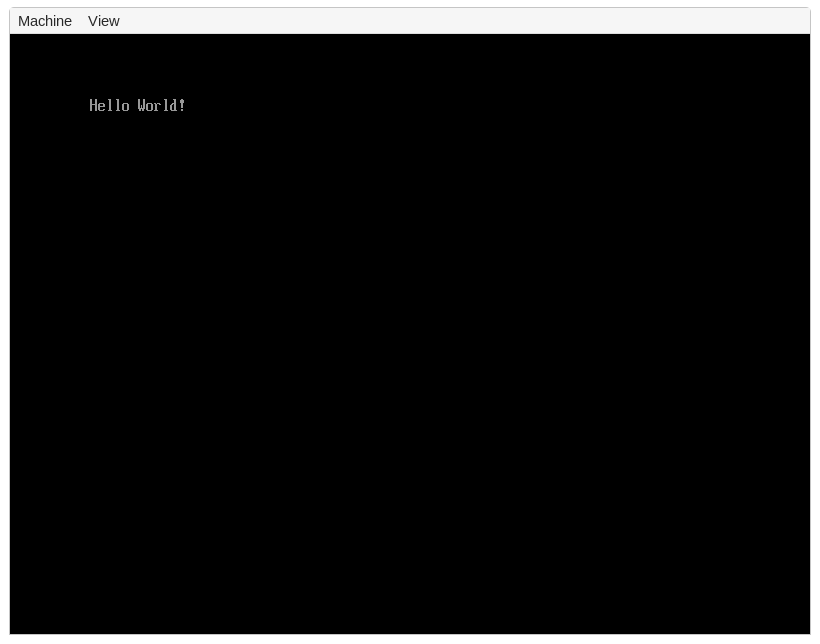
The [`Output`] type also allows to use different colors through its [`set_color`] method and some other customization options.
[`set_color`]: https://docs.rs/uefi/0.8.0/uefi/proto/console/text/struct.Output.html#method.set_color
All of these functions are directly provided by the UEFI firmware, the `uefi` crate just provides some abstractions for this.
By looking at the source code of the `uefi` crate, we see that the [`SystemTable`][system-table-src] is just a pointer to a [`SystemTableImpl`] struct, which is created by the UEFI firmware in a standardized format (see section _4.3_ of the UEFI specification ([PDF][uefi-pdf])).
It has a `stdout` field, which is a pointer to an [`Output`][output-src] table.
The methods of the `Output` type are just [small wrappers] around these function pointers, so all of the functionality is implemented directly in the UEFI firmware.
[system-table-src]: https://docs.rs/uefi/0.8.0/src/uefi/table/system.rs.html#44-47
[`SystemTableImpl`]: https://docs.rs/uefi/0.8.0/src/uefi/table/system.rs.html#209-230
[output-src]: https://docs.rs/uefi/0.8.0/src/uefi/proto/console/text/output.rs.html#13-29
[small wrappers]: https://docs.rs/uefi/0.8.0/src/uefi/proto/console/text/output.rs.html#41-43
### Boot Services
When we take a closer look at the documentation of the [`SystemTable`] type, we see that it has a generic `View` parameter.
The documentation provides a good explanation why this parameter is needed:
> [...] Not all UEFI services will remain accessible forever.
Some services, called "boot services", may only be called during a bootstrap stage where the UEFI firmware still has control of the hardware, and will become unavailable once the firmware hands over control of the hardware to an operating system loader.
Others, called "runtime services", may still be used after that point [...]
>
> We handle this state transition by providing two different views of the UEFI system table, the "Boot" view and the "Runtime" view.
The distinction between "boot" and "runtime" services is defined directly by the UEFI standard ( in section 6), the `uefi` crate just provides an abstraction for this.
The distinction is necessary because the UEFI firmware provides such a wide range of functionality, for example a memory allocator or access to network devices.
These functions can easily conflict with operating system functionality, so they are only available before an operating system is loaded.
To hand over hardware control from the UEFI firmware to an operating system, the UEFI standard provides an `ExitBootServices` function.
The `uefi` crate abstracts this function as an [`SystemTable::exit_boot_services`] method.
[`SystemTable::exit_boot_services`]: https://docs.rs/uefi/0.8.0/uefi/table/struct.SystemTable.html#method.exit_boot_services
### Interesting UEFI Protocols
The UEFI firmware supports many different hardware functions through so-called protocols.
Most of them are not used by traditional operating systems, which instead implement their own drivers and access the different hardware devices directly.
There are multiple reasons for this.
For one, many protocols are no longer available after exiting boot services, so using the protocols is only possible as long as UEFI stays in control of the hardware (including physical memory allocation).
Other reasons are performance (most drivers provided by UEFI are not optimized), control (not all device features are supported in UEFI), and compatibility (most operating systems want to run on non-UEFI systems too).
Even if most operating systems quickly use the `ExitBootServices` function to take over hardware control, there are still a few useful UEFI protocols that are useful when implementing a bootloader.
In the following, we present a few useful protocols and show how to use them.
### Memory Allocation
As already mentioned above, the UEFI firmware is in control of memory until we use `ExitBootServices`.
To supply additional memory to applications, the UEFI standard defines different memory allocation functions, which are defined in section _6.2_ of the standard ([PDF][uefi-pdf]).
The `uefi` crate supports them too: We have to use the [`SystemTable::boot_services`] function to get access to the [`BootServices`] table.
Then we can call the [`allocate_pool`] method to allocate a number of bytes from a UEFI-managed memory pool.
Alternatively, we can allocate a number of 4KiB pages through [`allocate_pages`].
To free allocated memory again, we can use the [`free_pool`] and [`free_pages`] methods.
[`SystemTable::boot_services`]: https://docs.rs/uefi/0.8.0/uefi/table/struct.SystemTable.html#method.boot_services
[`BootServices`]: https://docs.rs/uefi/0.8.0/uefi/table/boot/struct.BootServices.html
[`allocate_pool`]: https://docs.rs/uefi/0.8.0/uefi/table/boot/struct.BootServices.html#method.allocate_pool
[`allocate_pages`]: https://docs.rs/uefi/0.8.0/uefi/table/boot/struct.BootServices.html#method.allocate_pages
[`free_pool`]: https://docs.rs/uefi/0.8.0/uefi/table/boot/struct.BootServices.html#method.free_pool
[`free_pages`]: https://docs.rs/uefi/0.8.0/uefi/table/boot/struct.BootServices.html#method.free_pages
Using these methods, it is possible to create a Rust-compatible [`GlobalAlloc`], which allows linking the [`alloc`] crate (see the other posts on this blog).
The `uefi` crate already provides such an allocator if we enable its `alloc` feature:
[`GlobalAlloc`]: https://doc.rust-lang.org/nightly/core/alloc/trait.GlobalAlloc.html
[`alloc`]: https://doc.rust-lang.org/nightly/alloc/index.html
```toml
# in Cargo.toml
[dependencies]
uefi = { version = "0.8.0", features = ["alloc"] }
```
Now we can use the `alloc` crate in our UEFI application:
```rust
// in src/main.rs
// the `alloc_error_handler` attribute is still unstable
#![feature(alloc_error_handler)]
// link the alloc crate
extern crate alloc;
use alloc::vec::Vec;
#[entry]
fn efi_main(
image: uefi::Handle,
system_table: uefi::table::SystemTable,
) -> uefi::Status {
// ...
(as before)
// initialize the allocator
unsafe {
uefi::alloc::init(system_table.boot_services());
}
// we can now use the allocator
let mut v = Vec::new();
v.push(1);
v.push(2);
writeln!(stdout, "v = {:?}", v).unwrap();
loop {}
}
/// This function is called when an allocation fails,
/// typically because the system is out of memory.
#[alloc_error_handler]
fn alloc_error(_layout: Layout) -> ! {
panic!("out of memory")
}
```
To compile it, we need a slight modification to our build command since the `alloc` crate needs to be cross-compiled for our UEFI target as well:
```bash
cargo build --target x86_64-unknown-uefi -Z build-std=core,alloc \
-Z build-std-features=compiler-builtins-mem
```
The only change is that `build-std` is now set to `core,alloc` instead of just `core`.
Note that the UEFI-provided allocation functions are only usable until `ExitBootServices` is called.
This is the reason that the `uefi::alloc::init` function requires `unsafe`.
### Locating the ACPI Tables
The [ACPI] standard is used to discover and configure hardware devices.
It consists of multiple tables that are placed somewhere in memory by the firmware.
To find out where in memory these tables are, we can use the UEFI configuration table, which is defined in section _4.6_ of the standard ([PDF][uefi-pdf]).
To access it with the `uefi` crate, we use the [`SystemTable::config_table`] method, which returns a slice of [`ConfigTableEntry`] structs.
To find the relevant ACPI [RSDP] table, we look for an entry with a [GUID] that is equal to [`ACPI_GUID`] or [`ACPI2_GUID`].
The `address` field of that entry then tells us the memory address of the RSPD table.
[ACPI]: https://en.wikipedia.org/wiki/Advanced_Configuration_and_Power_Interface
[`SystemTable::config_table`]: https://docs.rs/uefi/0.8.0/uefi/table/struct.SystemTable.html#method.config_table
[`ConfigTableEntry`]: https://docs.rs/uefi/0.8.0/uefi/table/cfg/struct.ConfigTableEntry.html
[RSDP]: https://wiki.osdev.org/RSDP
[GUID]: https://de.wikipedia.org/wiki/Globally_Unique_Identifier
[`ACPI_GUID`]: https://docs.rs/uefi/0.8.0/uefi/table/cfg/constant.ACPI_GUID.html
[`ACPI2_GUID`]: https://docs.rs/uefi/0.8.0/uefi/table/cfg/constant.ACPI2_GUID.html
Putting things together, the code can look like this:
```rust
use uefi::table::cfg;
let mut config_entries = system_table.config_table().iter();
let rsdp_addr = config_entries
.find(|entry| matches!(entry.guid, cfg::ACPI_GUID | cfg::ACPI2_GUID))
.map(|entry| entry.address);
writeln!(stdout, "rsdp addr: {:?}", rsdp_addr).unwrap();
```
We won't do anything with RSDP table here, but bootloaders typically provide it to loaded kernels, e.g. via the boot information structure they send.
### Graphics Output
As noted above, the text-based output protocol is only available until exiting UEFI boot services.
Another drawback of it is that in only provides a text-based interface instead of allowing to set individual pixels.
Fortunately, UEFI also supports a _Graphics Output Protocol_ (GOP) that fixes both of these problems.
We can use it in the following way:
```rust
use uefi::proto::console::gop::GraphicsOutput;
let protocol = system_table.boot_services().locate_protocol::()
.unwrap().unwrap();
let gop = unsafe { &mut *protocol.get() };
writeln!(stdout, "current gop mode: {:?}", gop.current_mode_info()).unwrap();
writeln!(stdout, "framebuffer at: {:#p}", gop.frame_buffer().as_mut_ptr()).unwrap();
```
The [`locate_protocol`] method can be used to locate any protocol that implements the [`Protocol`] trait, including [`GraphicsOutput`].
Not all protocols are available on all systems though.
In our case, we use `unwrap` to panic if the GOP protocol is not available.
[`locate_protocol`]: https://docs.rs/uefi/0.8.0/uefi/table/boot/struct.BootServices.html#method.locate_protocol
[`GraphicsOutput`]: https://docs.rs/uefi/0.8.0/uefi/proto/console/gop/struct.GraphicsOutput.html
[`Protocol`]: https://docs.rs/uefi/0.8.0/uefi/proto/trait.Protocol.html
Since the UEFI-provided functions are neither thread-safe nor reentrant, the `locate_protocol` method returns an [`&UnsafeCell`], which is unsafe to access.
We are sure that this is the first and only time that we use the GOP protocol, so we directly convert it to a `&mut` reference by using the [`UnsafeCell::get`] method and then converting the resulting `*mut` pointer via `&mut *`.
[`&UnsafeCell`]: https://doc.rust-lang.org/nightly/core/cell/struct.UnsafeCell.html
[`UnsafeCell::get`]: https://doc.rust-lang.org/nightly/core/cell/struct.UnsafeCell.html#method.get
The [`GraphicsOutput`] type provides a wide range of functionality for configuring a pixel-based framebuffer.
Through [`current_mode_info`], [`modes`], and [`set_mode`] we can query the currently active graphics mode, get a list of all supported modes, and enable a different mode.
The [`frame_buffer`] method gives us direct access to the framebuffer through a [`FrameBuffer`] abstraction type.
We can then read the raw pointer and size of the framebuffer via [`FrameBuffer::as_mut_ptr`] and [`FrameBuffer::size`].
[`current_mode_info`]: https://docs.rs/uefi/0.8.0/uefi/proto/console/gop/struct.GraphicsOutput.html#method.current_mode_info
[`modes`]: https://docs.rs/uefi/0.8.0/uefi/proto/console/gop/struct.GraphicsOutput.html#method.modes
[`set_mode`]: https://docs.rs/uefi/0.8.0/uefi/proto/console/gop/struct.GraphicsOutput.html#method.set_mode
[`frame_buffer`]: https://docs.rs/uefi/0.8.0/uefi/proto/console/gop/struct.GraphicsOutput.html#method.frame_buffer
[`FrameBuffer`]: https://docs.rs/uefi/0.8.0/uefi/proto/console/gop/struct.FrameBuffer.html
[`FrameBuffer::as_mut_ptr`]: https://docs.rs/uefi/0.8.0/uefi/proto/console/gop/struct.FrameBuffer.html#method.as_mut_ptr
[`FrameBuffer::size`]: https://docs.rs/uefi/0.8.0/uefi/proto/console/gop/struct.FrameBuffer.html#method.size
As already mentioned, the GOP framebuffer stays available even after exiting boot services.
Thus we can simply pass the framebuffer pointer, its mode info, and its size to the kernel, which can then easily write to screen, as we show in our upcoming _Screen Output_ post.
### Physical Memory Map
When the kernel takes control of memory management, it needs to know which physical memory areas are freely usable, which are still in use, and which are reserved by some hardware devices.
To query this _memory map_ from the UEFI firmware, we can use the [`SystemTable::memory_map`] method.
However the resulting memory map might still change as long as the UEFI firmware has control over memory and we still call other UEFI functions.
For this reason, the UEFI firmware also returns an up-to-date memory map when [exiting boot services], which is the recommended way of retrieving the memory map.
[`SystemTable::memory_map`]: https://docs.rs/uefi/0.8.0/uefi/table/boot/struct.BootServices.html#method.memory_map
[exiting boot services]: https://docs.rs/uefi/0.8.0/uefi/table/struct.SystemTable.html#method.exit_boot_services
To use the [`exit_boot_services`], we need to provide a buffer that is big enough to hold the memory map.
To find out how large the buffer needs to be, we can use the [`BootServices::memory_map_size`] method.
Then we can use the [`allocate_pool`] method to allocate a buffer region of that size.
However, since the `allocate_pool` call might change the memory map, it might become a bit larger than returned by `memory_map_size`.
For this reason, we need to allocate a bit extra space.
This can be implemented in the following way:
[`exit_boot_services`]: https://docs.rs/uefi/0.8.0/uefi/table/struct.SystemTable.html#method.exit_boot_services
[`BootServices::memory_map_size`]: https://docs.rs/uefi/0.8.0/uefi/table/boot/struct.BootServices.html#method.memory_map_size
```rust
use uefi::table::boot::{MemoryDescriptor, MemoryType};
use core::{mem, slice};
let mmap_storage = {
let max_mmap_size = system_table.boot_services().memory_map_size()
+ 8 * mem::size_of::();
let ptr = system_table
.boot_services()
.allocate_pool(MemoryType::LOADER_DATA, max_mmap_size)?
.unwrap();
unsafe { slice::from_raw_parts_mut(ptr, max_mmap_size) }
};
uefi::alloc::exit_boot_services();
let (system_table, memory_map) = system_table.exit_boot_services(image, mmap_storage)
.unwrap().unwrap()
```
This returns a new [`SystemTable`] instance that no longer provides access to the boot services.
The `memory_map` return type is an iterator of [`MemoryDescriptor`] instances, which describe the physical start address, size, and type of each memory region.
[`MemoryDescriptor`]: https://docs.rs/uefi/0.8.0/uefi/table/boot/struct.MemoryDescriptor.html
Note that we also need to call `uefi::alloc::exit_boot_services()` before exiting boot services to uninitialize the heap allocator again.
Otherwise undefined behavior might occur if we accidentally use the `alloc` crate again afterwards.
## Creating a Bootloader
Now that we know how to set up a framebuffer and query relevant system information, we're only missing one crucial function to turn our UEFI application into a bootloader: loading a kernel.
This includes loading a kernel executable into memory, setting up an execution environment, and passing control to the kernel's entry point function.
Unfortunately, this process can be quite complex so that we cannot cover it here.
However, we will give some high-level instructions in the following.
### Loading the Kernel from Disk
The first step is to load the kernel executable from disk into main memory.
One approach for including our kernel could be to place it in the FAT partition created by our `disk_image` crate.
Then we could use the _simple file system_ protocol of UEFI (see section 12.3 of the standard ([PDF][uefi-pdf])) to load it from disk into memory.
The `uefi` crate supports this protocol through its [`SimpleFileSystem`] type.
[`SimpleFileSystem`]: https://docs.rs/uefi/0.8.0/uefi/proto/media/fs/struct.SimpleFileSystem.html
To keep things simple, we will use a different appoach here.
Instead of loading the kernel separately, we place its bytes as a `static` variable inside our bootloader executable.
This way, the UEFI firmware directly loads it into memory when launching the bootloader.
To implement this, we can use the [`include_bytes`] macro of Rust's `core` library:
[`include_bytes`]: https://doc.rust-lang.org/nightly/core/macro.include_bytes.html
```rust
static KERNEL: &[u8] = include_bytes!("path/to/the/kernel/executable");
```
### Parsing the Kernel Executable
After loading the kernel executable into memory (one way or another), we need to parse it.
In the following, we assume that the kernel uses the [ELF] executable format, which is popular in the Linux world.
This is also the excutable format that the kernel created in this blog series uses.
The ELF format consists of several headers that describe the executable and define a number of sections.
Typically, there is a section called `.text` that contains the actual executable code.
Immutable values such as string constants are placed in a section named `.rodata` ("read-only data").
For mutable data (e.g. a `static` containing a `Mutex`), a section named `.data` is used.
There is also a section named `.bss` that stores all data that is initialized with zero values (this allows to reduce the size of the binary).
The various ELF headers are useful in different situations.
For loading the executable into memory, the _program header_ is most relevant.
It basically groups all the sections of the executable into different groups by their access permissions.
There are typically four groups:
- Read-only and executable: This contains the `.text` section and all other executable code.
- Read-only: This contains the `.rodata` section and all other sections with immutable, non-executable data.
- Read-write: This includes the `.data` section and `.bss` sections.
The zeroes of the `.bss` section are not actually stored, only its size is listed.
Thus, no memory is wasted for storing zeroes.
There are various tools to analyze ELF files and read out most headers.
The classical tools are `readelf` and `objdump`.
There are also several Rust crates for parsing an ELF files, so we don't need to to implement it on our own.
Some examples are [`goblin`], [`elf`], and [`xmas-elf`].
The `xmas-elf` crate works quite well in `no_std` environments, so that's the one I would recommend for a bootloader implementation.
[`goblin`]: https://docs.rs/goblin/0.3.4/goblin/
[`elf`]: https://docs.rs/elf/0.0.10/elf/
[`xmas-elf`]: https://docs.rs/xmas-elf/0.7.0/xmas_elf/
The parsing process looks roughly like this:
```rust
let elf_file = ElfFile::new(KERNEL)?;
header::sanity_check(&elf_file)?;
for segment in elf_file_program_iter() {
program::sanity_check(segment, &elf_file)?;
if let Type::Load = segment.get_type()? {
todo!("map segment");
}
}
```
### Virtual Memory Mapping
In order to run multiple programs isolated from each other in parallel, modern computers use a technique called [_virtual memory_].
We will cover virtual memory in detail later in this series, but the basic idea is to provide a _virtual address space_ split in 4KiB large blocks called _pages_.
A [_page table_] maps each page to an arbitrary block of physical memory.
This way, multiple programs can run at the same virtual address without conflict because they map to different physical memory behind the scenes.
[_virtual memory_]: https://en.wikipedia.org/wiki/Virtual_memory
[_page table_]: https://en.wikipedia.org/wiki/Page_table
Virtual memory also has lots of other advantages such as fine-grained access control (read/write/execute permissions per page), support for safe shared memory (multiple read-only pages can be mapped to the same frame), and transparent swapping (moving some memory content to disk when main memory becomes too full).
For loading our kernel into virtual memory, we first need to create a new page table.
In it, we add mappings for all segments of the kernel executable at their specified virtual addresses.
We already loaded the kernel into physical memory, so we can calculate the corresponding frame for each page by adding the segment offset to the physical start address of the `KERNEL` static.
Put together, the mapping process could look like this:
```rust
if let Type::Load = segment.get_type()? {
let phys_start = phys_offset(KERNEL) + segment.offset();
let phys_end = phys_start + segment.file_size();
let virt_start = segment.virtual_addr();
let virt_end = virt_start + segment.mem_size();
let permissions = permissions_from_flags(segment.flags());
for frame in frame(phys_start)..=frame(phys_end -1) {
// TODO: create page table mapping for frame with permissions
// at corresponding virtual address
}
if virt_end > phys_end {
// TODO: there is a `.bss` section in this segment -> map next
// (virt_end - phys_end) bytes to free physical frame and initialize
// them with zero
}
}
```
As mentioned above, `.bss`-like sections are not stored in the executable since storing their null bytes would only bloat the executable.
This results in ELF segments whose `mem_size()` (i.e. size in memory) is larger than their `file_size()` (i.e. segment size in the executable file).
These segments require special handling: We need to allocate additional unused physical frames from the memory map we created above and initialize them with zero.
Then we can map the additional `mem_size() - file_size()` bytes to these frames.
### Creating a Stack
After creating the page table mappings for the kernel, we need to allocate a [execution stack] for it.
For that, we choose a region of unused physical memory from the physical memory map and map it to some virtual address.
Ideally, we choose the virtual address range in a way that the page immediately before it is not mapped.
Thus, we create a so-called _guard page_ that ensures that stack overflows lead to a CPU exception (a page fault) instead of corrupting other data.
[execution stack]: https://en.wikipedia.org/wiki/Call_stack
### Switching to Kernel
The final step is to switch to the kernel address space and jump to its entry point function.
For this, we need to fill the [`CR3`] register with the address of the created kernel page table and the `rsp` stack pointer register with the end address of the stack (the stack grows downwards on x86_64).
Then we can use the `jmp` or `call` instruction to jump to the kernel entry point function.
These steps require [inline assembly] and should be done directly after each other (in one `asm` block) because changing the `cr3` and `rsp` registers will break any following Rust code in the bootloader.
[`CR3`]: https://en.wikipedia.org/wiki/Control_register#CR3
[inline assembly]: https://doc.rust-lang.org/unstable-book/library-features/asm.html
The context switch function itself must be mapped to both the kernel and bootloader address spaces at the exact same address.
This is required because the address space switch happens directly when reloading the `CR3` register, so while the code is still executing the code of the context switch function.
So the context switch function must be mapped in the new address space too.
The kernel can of course remove this mapping later.
## Summary
We saw that the UEFI standard already implements lots of functionality.
Rust's built-in support for the `x86_64-unknown-uefi` target makes it quite easy to create a minimal UEFI application.
To turn the UEFI application into a bootable disk image, we created a `disk_image` builder binary that uses the [`fatfs`] and [`gpt`] crates.
The easiest way to access the services of the UEFI system table is the [`uefi`] crate.
It provides abstractions for all kinds of UEFI protocols, including graphics output (text and framebuffer-based), memory allocation, and various system information (e.g. memory map and RSDP address).
To turn the UEFI application into a bootloader, we first need to load the kernel executable from disk into memory.
We then parse it and create virtual memory mappings for its segments in a new page table.
We also need to allocate and map an execution stack for the kernel.
The final step is to load the `CR3` and `rsp` registers accordingly and invoke the kernel's entry point function.